


Keeping track of messages across multiple platforms can feel like spinning plates. One moment, you’re on WhatsApp; the next, you’re juggling Telegram, Slack, and iMessage. Beeper steps in to simplify that chaos by unifying all your conversations into a single, streamlined inbox. With its sleek design, powerful features, and the handy Beeper Mini widget, this app promises to make messaging effortless. Here’s an in-depth look at everything Beeper offers and why you might never go back to hopping between chat apps again.
Simple Setup, Instant Connection
You download Beeper on macOS, Windows, iOS, or Android, then link your accounts in just a few taps. Secure tokens keep your passwords safe while letting Beeper fetch messages on your behalf. Within minutes, you’ll see chats from WhatsApp, Telegram, Instagram Direct, Slack, and even iMessage (yes, Android users can finally send and receive iMessages without a Mac). It’s like opening a universal mailbox that delivers everything—no more remembering which app you used for that group chat.
Feature Highlights: Everything You Need in One Place
Beeper packs a surprising number of tools into its clean interface. Universal search lets you hunt down old attachments or forgotten links across all services in seconds. With customizable notifications, you decide which chats ring your phone and which stay muted when you need focus. Read receipts control gives you privacy; you can turn them off for certain accounts so nobody knows when you’ve seen their message. Themes let you switch between light, dark, or seasonal looks, so you can match your mood or brand style.
1. Beeper Mini: Your Tiny Powerhouse
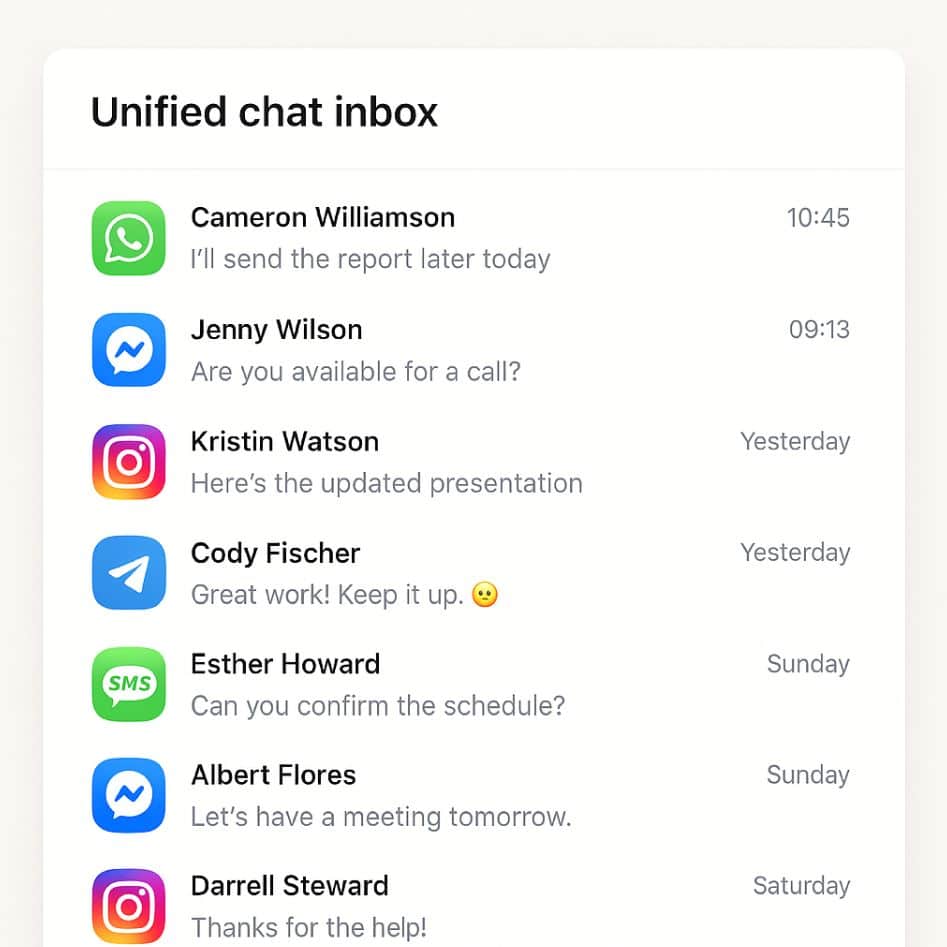
One standout perk is Beeper Mini. This compact widget lives in your menu bar or notification shade, displaying your three most recent conversations. It’s perfect when you’re deep in work and just want a quick peek at new messages. A single click expands the full chat without launching the main app. During back-to-back meetings, I pinned Beeper Mini to my desktop and never missed urgent updates—no more frantic Alt-Tabbing just to check one message.
2. Advanced Chat Management Tools
Beyond basic unification, Beeper offers smart filters that group chats by type or priority. You can tag work channels and personal threads differently, keeping business and leisure separate. The app’s threaded view for group conversations organises replies neatly, so you won’t lose track of side discussions. If you need a break, the snooze feature silences notifications until you’re ready, then delivers a recap of everything you missed. For power users, keyboard shortcuts and quick-action commands make navigation lightning fast—no mouse required.
3. Seamless Media and File Sharing
Sharing photos, videos, voice notes, and documents feels natural. Drag-and-drop works across all services, and Beeper handles large files by uploading them to its secure cloud and sending a download link. I tested sending a 200 MB video clip from my desktop to a WhatsApp group on my phone, and it arrived within seconds. The automatic compression keeps quality high, and you don’t have to worry about hitting size limits.
4. Security and Privacy You Can Trust
Beeper treats your data with care. End-to-end encryption remains intact on services that already use it, like WhatsApp and iMessage. When it syncs messages, it does so over secure channels, and you can enable device-level passcodes or biometric unlock for extra protection. The app also supports local message storage if you prefer not to have your chat history in the cloud. For busy professionals and privacy-conscious users alike, these options provide peace of mind.
5. Performance Under Pressure
Bringing together many services sounds like a recipe for lag, but Beeper delivers smooth scrolling and instant notifications. I ran it on both a MacBook Air and an older Android phone. Even with ten linked accounts and dozens of active group chats, I saw no stutters or delays. Syncing happens in the background without appreciably draining battery life. The only slowdown occurred during the initial import of a massive Slack workspace, but that was a one-time event.
3. Pricing Plans That Make Sense
Beeper’s free tier lets you connect up to three accounts—perfect for casual users who juggle a couple of messaging services. The $10 /month Pro plan unlocks unlimited account connections, advanced search filters, Beeper Mini, and priority customer support. Considering the time you save by not switching apps, plus the value of added productivity features, the upgrade feels like a bargain for anyone managing more than a handful of chats daily.
Anecdote: How Beeper Saved My Weekend
Last month, I tried coordinating a surprise party across WhatsApp, Slack, and a private Instagram group. I kept missing messages about cake flavors and arrival times because I switched apps too slowly. After installing Beeper Pro, I used the universal search to find dietary restrictions, muted non-urgent threads, and relied on Beeper Mini to glance at updates between errands. By party time, I’d nailed every detail—no more scrambling or miscommunication.
Should You Give Beeper a Try?
If you juggle more than two chat apps and crave simplicity, Beeper deserves a spot on your device. The free version provides a solid introduction, but Pro’s unlimited connections and Mini widget unlock the full magic. Whether you’re coordinating projects at work, staying in touch with friends and family, or just hate app-hopping, Beeper turns multiple inboxes into one focused hub.
Final Verdict
Beeper transforms messaging chaos into calm. From universal search and threaded conversations to customizable notifications and Beeper Mini’s quick-peek power, it packs indispensable tools into an intuitive package. You’ll spend less time toggling between apps and more time actually chatting. Give it a whirl—you might wonder how you ever managed without it.