


SIM swap attacks hijack your phone number and compromise your digital identity within minutes. Rather than debating the threat, this article focuses entirely on practical, proven alternative methods to protect yourself. These six strategies eliminate SIM swap vulnerability through technology and smarter practices.
Alternative Ways to Avoid SIM Swap Attacks: 6 Proven Protection Methods
1: Understanding eSIM Technology and How It Prevents SIM Swap Attacks
eSIM technology fundamentally changes how your phone number connects to your device. Instead of a removable physical card that attackers can steal or social engineer from carriers, the SIM is permanently embedded and soldered directly into your smartphone’s motherboard. An attacker cannot steal what doesn’t physically exist. They cannot remove it and move it to another device. They cannot trick a carrier into sending a replacement card because no physical card exists to send or intercept.
Current Adoption Rates Show eSIM Technology Is Becoming Mainstream
In 2024, eSIM was supported on approximately 23% of smartphones globally, with the U.S. leading at 41% of new devices. Industry analysts project that eSIM activation rates will reach 75% by 2030. ABI Research forecasts more than 403 million consumer eSIM-enabled devices to ship in 2025.
How eSIM Remote Provisioning Actually Works
When you switch carriers using eSIM, you simply scan a QR code using your carrier’s app. The carrier then remotely installs your complete phone profile onto your device. This digital handoff process requires strong cryptographic authentication to verify your identity properly. The carrier must verify that the person requesting eSIM activation is actually you and not a sophisticated scammer attempting fraud.
Unlike traditional physical SIM swaps, which can be completed in minutes with minimal identity verification, eSIM activation requires cryptographically secure mutual authentication between you and your carrier. This additional security layer makes it virtually impossible for attackers to successfully impersonate you during the activation process.
What You Should Do Right Now
When you purchase your next phone, prioritize eSIM capability as a key decision factor. Major manufacturers including Apple, Samsung, Google, Huawei, and Xiaomi all support eSIM technology and are expanding this support starting in 2026. By 2027, finding a modern smartphone without eSIM support will be significantly harder than finding one with it.
2: Using Authenticator Apps to Eliminate SMS Vulnerabilities
The Critical Problem with Relying on SMS Codes
SMS security codes are only secure if your phone remains under your complete control at all times. When an attacker takes control of your phone number through SIM swapping, those codes go directly to them rather than to you. This fundamental vulnerability explains why the US National Institute of Standards and Technology (NIST) updated SP 800-63-4 to emphasise phishing-resistant authenticators like FIDO2/WebAuthn passkeys and hardware security keys at AAL2/AAL3; SMS remains non-phishing-resistant for high-value accounts.
A Superior Alternative: Authenticator Applications
Authenticator applications such as Google Authenticator, Microsoft Authenticator, Authy, and 2FAS represent a significantly better security approach than SMS codes. These apps generate security codes directly on your smartphone using advanced encryption algorithms. Importantly, these security codes never travel through cellular networks. They don’t get sent via SMS. They are generated entirely locally on your device without transmitting any sensitive information.
Even if a scammer successfully steals your phone number through SIM swapping, they get absolutely nothing of value. The security codes were never transmitted anywhere over networks. They exist exclusively on your physical device.
How to Actually Implement This Strategy
During the login process, the application displays a QR code that you scan with your authenticator app. You simply open your preferred authenticator app and scan this unique code. A secret encryption key is then securely stored on your phone. From that point forward, whenever you log in to that account, the app automatically generates a new security code every 30 seconds.
The complete setup process takes approximately five minutes per account on average. The cost is absolutely zero dollars. The security improvement you gain is genuinely dramatic and measurable in preventing unauthorised access.
Start by protecting these accounts first, in this specific order of importance:
- Your email account: because controlling your email allows you to reset passwords on every other account you own
- Banking applications: because your financial resources are literally at direct stake
- Cryptocurrency exchanges: because stolen cryptocurrency is irreversible once transferred
- Work and business accounts: Because your income depends on their security
Every major platform in the world supports authenticator apps now: Google, Apple, Microsoft, your bank, and your cryptocurrency exchange.
Important Development: Cloud Backup Features
An important practical advancement arrived in April 2023: Google Authenticator added cloud backup and sync functionality, significantly reducing accidental lockouts when you change phones. If you prefer encrypted synchronisation, Authy, Duo, and 2FAS offer robust backup features with end-to-end encryption protection.
3: Enabling Biometric Verification to Prevent SIM Swap Fraud
Why Your Unique Fingerprint Is Significantly Better Than Any Password
Here’s something critical that a determined SIM swapper absolutely cannot accomplish under any circumstances: stealing your fingerprint through remote means. They cannot deepfake your fingerprint into digital existence. They cannot socially engineer your carrier into accepting their fingerprint as yours.
Biometric authentication effectively ties your account access directly to your own physical body. Your unique fingerprint and your face are literally impossible to replicate from a distance without sophisticated technology. This creates an authentication boundary that SIM swappers simply cannot breach using traditional methods.
How to Enable Biometric Protection on Your Carrier Account
Open your phone carrier’s mobile application on your smartphone. Look for sections labelled “account lock,” “security settings,” or “biometric protection” within the app interface. Enable either fingerprint unlock or face unlock, whichever you prefer. The entire process typically takes approximately five minutes to complete.
When someone tries to change your account settings or transfer your number, your carrier will request your fingerprint or facial scan as verification. Only you possess your unique biometric data.
Modern biometric systems even use sophisticated “liveness detection” technology that verifies an actual living person is authenticating your account, not a photograph or video recording. This advanced technology prevents deepfake attacks and mask spoofing techniques.
4: Deploying Hardware Security Keys
The Most Powerful Protection Option Available
Hardware security keys, such as the YubiKey, are small physical devices that you carry in your pocket or bag. When you need to log into a protected account, you insert the key into your device or tap it near your smartphone. Complex cryptographic authentication happens instantly. You are logged in securely.
No sensitive information is transmitted during this process. An attacker cannot replicate what that key accomplishes because they don’t have it in their physical possession.
Even if attackers somehow obtain your phone number, your passwords, and your email credentials, they still cannot access your account without the actual physical key in their possession.
When You Actually Need Hardware Security Keys
If you own and hold cryptocurrency, hardware security keys become absolutely essential for protecting your financial assets. If you operate a business and your email account is critical to your income, hardware keys are worth the inconvenience. If you manage and control high-value assets exceeding $ 100,000, hardware keys serve as essential insurance.
For all your other accounts? Hardware keys are optional, but worth serious consideration for maximum protection.
Getting Started with Hardware Security Key Implementation
You should purchase two separate security keys, with a cost range of approximately 25 to 80 dollars each. Register both keys on your most critical accounts and essential services. Keep one key securely stored in a safe at your home. Keep the other key with you in your everyday bag or pocket. Test your account recovery procedures immediately before you actually need them.
This takes approximately 30 minutes of setup time total. However, it provides the strongest possible protection available against account takeover attacks.
5: Understanding AI-Powered Fraud Detection Systems
How Machine Learning Protects You in Real-Time
Telecom carriers deploy sophisticated machine learning systems to detect potential SIM swap attempts in real time. These systems monitor billions of account changes on a daily basis, learning what constitutes normal behaviour and what indicates suspicious activity.
When someone attempts to swap your SIM card from an unusual geographic location, at an unusual time, using unusual methods, the AI system flags it immediately and prevents completion. The detection process happens in mere milliseconds, before the attack can complete and cause damage.
What This Advancement Means for Your Personal Digital Security
You automatically benefit from these protections without any action required on your part. What you can actively do to support its effectiveness includes: Use a strong and unique password on your carrier account instead of generic options. Enable notifications for all account changes. Respond instantly if you receive an alert about suspicious SIM activity. Check your account monthly for any unauthorised changes.
This combination of AI protection and your personal vigilance makes you extremely difficult for attackers to target successfully.
6: Industry Collaboration and Regulatory Frameworks
How Multiple Organizations Work Together to Protect You
Financial institutions and telecom carriers are actively building real-time alert systems that communicate instantly. When a SIM change occurs, your bank receives notification within seconds. If the activity appears suspicious, your bank can freeze your account immediately before cryptocurrency can possibly be drained.
The United States, through FCC 23-95, requires carriers to notify customers of SIM changes and port-outs. The European Union, through eIDAS 2.0, supports stronger digital identity frameworks. UK Ofcom continues to monitor SIM-swap fraud under existing porting rules. These regulations require carriers to notify customers instantly of all SIM changes and implement secure authentication mechanisms.
By the year 2026, this comprehensive regulatory framework will become the standard operating procedure across all developed nations.
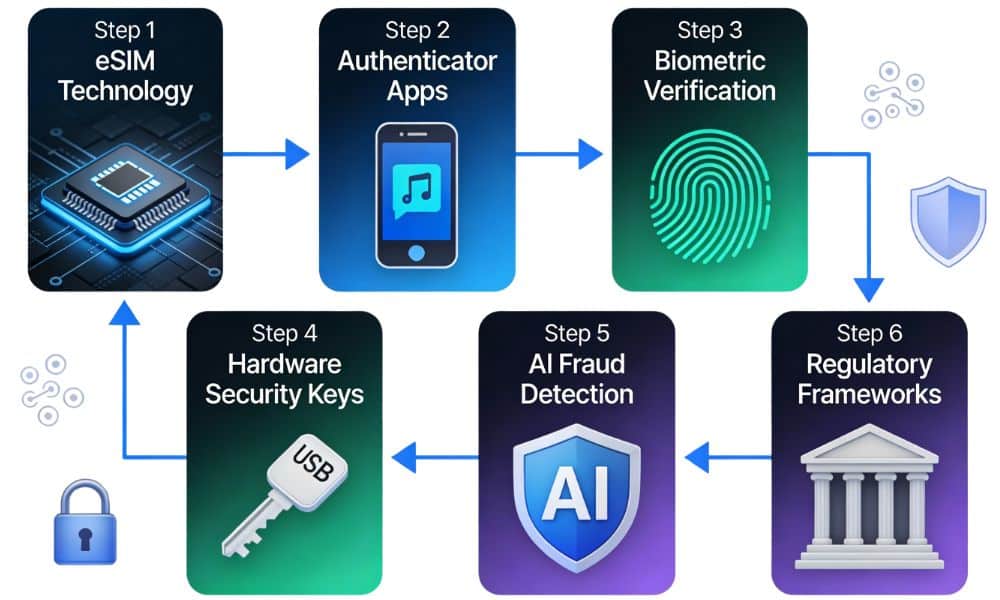
Beyond SMS: Practical, Device‑Bound Defences to Prevent SIM‑Swap Hijacking
Stop using your phone number as the single key to your life online. The protective methods covered above—eSIM technology, authenticator apps, biometric verification, hardware security keys, AI detection, and regulatory oversight—work together to create a multi-layered defense strategy. The key is implementing device-bound, cryptographic authenticators that replace your reliance on SMS codes. Combine carrier account locks with phishing-resistant authentication, and remove personal data that fuels social engineering attacks. This comprehensive approach significantly raises the cost and complexity for attackers, making your account far too difficult to compromise.
Quick Decision Guide: Choose Your Protection Path
| Method | Timeline | Effort | Security Level | Cost | Best For |
|---|---|---|---|---|---|
| eSIM Technology | 2026+ | Purchase a new phone | Very High | $300-800 | Everyone eventually |
| Authenticator Apps | Today | 5 min/account | Very High | Free | Everyone starts now |
| Biometric Verification | This week | 5 min setup | High | Free | Everyone this week |
| Hardware Security Keys | 30 days | Complete setup | Highest | $50-160 | High-value accounts |
| AI Fraud Detection | Ongoing | Zero effort | High | Free | Everyone automatically |
| Regulatory Frameworks | 2026+ | None needed | Baseline | Free | Everyone eventually |
Choose Your Path Based on Your Needs:
- Protect Money and Crypto Now: Adopt FIDO2/passkeys or a hardware security key for email, banks, and exchanges. This combination provides very high resistance to SIM swap attacks and meets NIST recommendations for high-value accounts.
- Need a Fast, Low-Cost Fix: Switch to a TOTP authenticator app (with encrypted backup) and enable carrier locks/PINs immediately. This approach costs nothing and takes 20 minutes to implement across your critical accounts.
- Running an Organisation: Plan a passkey rollout for employee accounts and integrate SIM-swap detection APIs into your fraud workflows. This comprehensive approach protects your organisation while maintaining usability.
Practical Alternatives: Step-by-Step Implementation
1. Move Critical Accounts Off SMS
For email, banking, and cryptocurrency, enable passkeys using FIDO2/WebAuthn or register a hardware security key. The US National Institute of Standards and Technology now emphasises phishing-resistant authenticators and recommends device-bound cryptographic methods for high-value accounts. If a service lacks passkey support, use a TOTP app (Authy, Google Authenticator) with encrypted backup and store offline recovery codes.
2. Lock Your Carrier Account and Set a Transfer PIN
Turn on Number Lock, SIM Protection, or Wireless Account Lock and insist on multi-channel notifications for any port-out requests. Ask your carrier to note that in-store ID verification is required for all SIM changes. This single step creates significant friction for attackers.
3. Push Banks and Exchanges to Use Network Checks
Financial services can add a layer of defence by querying network-level SIM-swap detection APIs before approving high-risk transactions. This makes a sudden port-out visible to fraud teams instantly.
4. Harden Your Account Recovery Paths
Remove phone numbers from account recovery where possible. Keep secondary passkeys and backup codes in a secure password manager or offline vault to avoid lockouts. This prevents attackers from using account recovery as an alternative attack path.
5. Reduce Your Social Engineering Surface
Prune birthdates, addresses, and family names from public profiles and use unique passwords. Attackers rely on this public data to pass carrier verification checks. The less personal information available publicly, the harder you are to target.
Risks, Trade-Offs, and What to Watch For
While the protection methods outlined above are effective, each involves certain trade-offs and considerations:
- Usability vs. Security: Hardware security keys are the safest option but add friction to your login process. Plan for user training and establish reliable recovery options before deploying hardware keys widely.
- Recovery Complexity: Losing a passkey or hardware key device can lock you out of critical accounts. Store recovery codes securely and register multiple authenticators so you have backup access methods.
- Carrier Variability and Insider Risk: Carrier locks help significantly but aren’t completely foolproof. Insider collusion and weak procedures can still create windows of vulnerability. Combine carrier controls with cryptographic multi-factor authentication for maximum protection.
- Emerging Threats: AI deepfakes and remote eSIM provisioning increase both social-engineering and technical attack surfaces. Treat eSIM adoption as a convenience improvement that still requires stronger provisioning controls and regular vendor security patches.
How UK & US Users Can Harden Mobile Security Today
US Carriers: Specific Actions You Can Take Now
- Verizon: Enable SIM Protection and Number Lock in the My Verizon app. Number Lock blocks port-outs until you toggle it off.
- T-Mobile: Turn on Account Takeover Protection and set a Number Transfer PIN that is required for any port-out.
- AT&T: Activate Wireless Account Lock in the myAT&T app to block SIM/eSIM changes, device upgrades, and number transfers until you unlock it.
UK Carriers: Specific Actions You Can Take Now
Ask your carrier to require enhanced verification on SIM changes. Request a strong account PIN and multi-channel port-out notifications. While UK port-outs require a PAC code, insider collusion or persuasive attackers can still create windows of risk. Use Cifas Fraudscape data to justify stronger account flags.
Universal Action: Pick a Strong Account PIN
Pick a long, random account PIN that you never reuse elsewhere. Where possible, request in-store ID verification for SIM changes (US retailers and some UK providers can note this permanently in your account).
Move Critical Accounts Away From SMS
For email, banking, brokers, and cryptocurrency, adopt passkeys using FIDO2/WebAuthn or hardware security keys like YubiKey or Google Titan. If your service doesn’t support passkeys yet, use authenticator-app codes over SMS and enable backup/sync to avoid lockouts.
Reduce the Data That Fuels Phone Number Hijacking
Prune birthdates, addresses, and family details from public profiles because these become “correct answers” in support scripts. Use unique passwords via a manager and review login alerts weekly. If you are targeted repeatedly, UK users can explore Cifas Protective Registration; US users should consider credit freezes and fraud alerts.
What to Do If You Think You’re Being Targeted?
Red Flags That Indicate an Attack
Sudden “No Service” on your phone despite normal coverage; a burst of password-reset emails you didn’t request; unexpected bank or cryptocurrency new-device alerts.
Quick Actions to Take Immediately
Call your carrier from another phone using the official number on your bill. Report an unauthorised SIM change or port and request reversal, plus account locks. Contact your bank and exchange fraud teams immediately. Rotate your passwords and upgrade to phishing-resistant 2FA.
File a report with IC3.gov (US) or the UK police’s cybercrime channels, as early reporting can improve outcomes. Reset your email first because it controls most account recovery. Secure it with passkeys or hardware keys before moving through financial and high-value accounts.
FAQs: Quick Answers to Common Questions
Q1: What’s the fastest way to protect myself right now?
Enable authenticator apps on your three most important accounts (email, banking, and cryptocurrency) in about 15 minutes. This single action eliminates the primary attack vector SIM swappers depend on. Then enable carrier account locks, which takes another 10 minutes.
Q2: Which protection method is the strongest?
Hardware security keys offer the highest protection level for critical accounts like email and cryptocurrency exchanges. They’re virtually impossible for attackers to compromise because they require physical possession. However, they add some friction to your login process, so they’re best for your most valuable accounts.
Q3: Do I have to implement all 6 methods?
No. Start with authenticator apps (free, 15 minutes) and carrier locks/PINs (5 minutes). These two steps prevent the vast majority of SIM swap attacks. Add biometric verification next, then consider hardware keys for your highest-value accounts. Build your protection gradually based on your needs and account value.
Q4: What if my carrier doesn’t support biometric authentication yet?
Contact their support team to request this feature. Meanwhile, use strong authenticator apps with encrypted backup and set a carrier account PIN. These interim protections are robust and will keep your account secure while you wait for biometric support.
Q5: Will any of these methods lock me out of my own accounts?
Possibly, if you lose a passkey or hardware key, but this is preventable. Store offline recovery codes in a secure vault, register multiple authenticators on each account, and keep detailed records of your backup access methods. Test your recovery procedures before you actually need them.
Conclusion: Start Protecting Yourself Today
SIM swap attacks are completely preventable when you implement these alternative protection methods. This isn’t about living in constant fear—it’s about taking practical steps that genuinely work.
Start today by enabling authenticator apps on your three most important accounts: email, banking, and cryptocurrency. This single action, which takes approximately 15 minutes total, eliminates the primary attack vector that SIM swappers depend on.
Next, enable biometric protection on your carrier account (five minutes). Then request a carrier account lock from your phone provider (another five minutes).
Thirty minutes of effort, spread across one week, prevents the vast majority of SIM swap attacks from successfully targeting you. By 2027, you’ll be using eSIM, passkeys, and hardware keys as your default authentication methods. The threat will become essentially obsolete.
The future of digital security is here. You simply need to adopt these protective measures to secure your digital identity and protect everything you own online.