


The field of music downloading and conversion is highly competitive, with the challenge of removing digital rights management (DRM) protection. Today, we will have a comprehensive review of a prominent tool for downloading Apple Music, MuConvert Apple Music Converter. Looking through, you will gain valuable insights into its major features, system requirements, and pricing plans. Let’s go!
MuConvert Apple Music Converter Overview
MuConvert Apple Music Converter, one of the best DRM removal software for Apple Music, emerges as a versatile software designed to meet the diverse demands of Apple Music subscribers.
This software empowers you to convert Apple Music content into popular formats like MP3, M4A, WAV, and FLAC, while retaining the quality of the original audio. Meanwhile, speed is of the essence, and MuConvert delivers an impressive batch conversion capability, performing at a staggering speed of up to 10 times faster than its competitors. This not only saves you precious time but also ensures a seamless user experience.
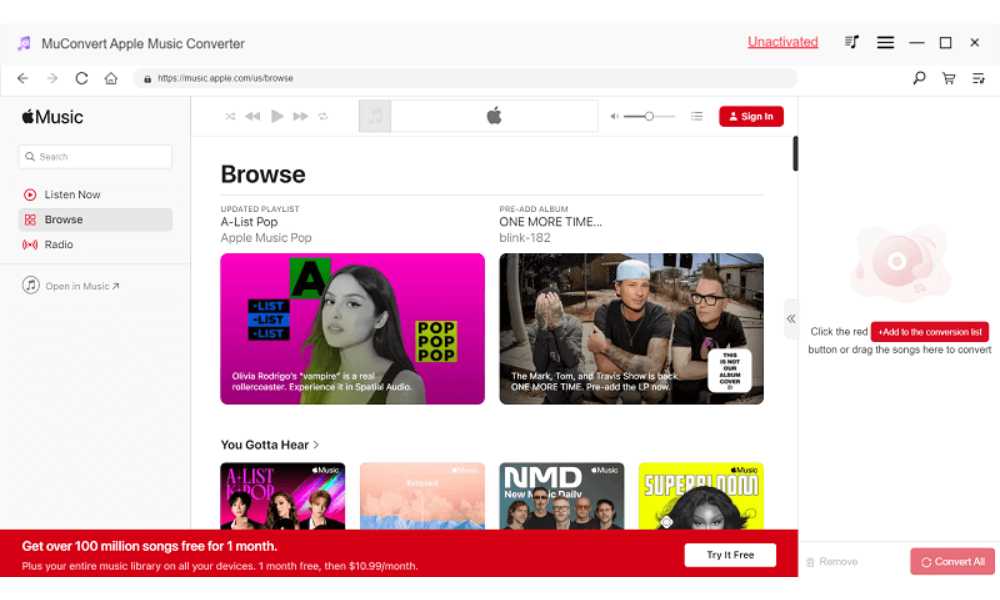
Taking convenience a step further, MuConvert Apple Music Converter is equipped with an integrated Apple Music Web Player, saving your time and effort to download extra apps. MuConvert also retains the essential ID3 tags, ensuring that your music library remains well-organized.
To top it all off, this versatile software caters to users on both Windows and Mac platforms. Its commitment to performance and compatibility is evident in the seamless in-app experience it provides, making it an indispensable tool for Apple Music subscribers. If you’re ready to embark on this exploration of the MuConvert Apple Music Converter, join us as we dive into a detailed review of its features.
Main Features of MuConvert Apple Music Converter
Given the constraints of word count, I’ve selected five key features for an in-depth review.
High-Quality Music Output
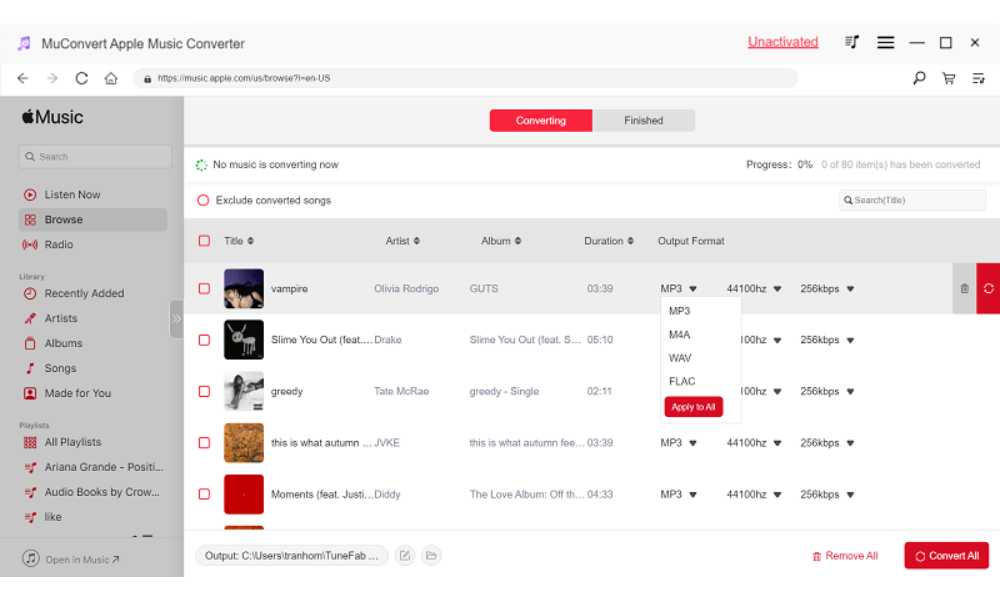
Music convertor allows you to effortlessly remove Apple Music DRM while saving the same exceptional music quality. It maintains Apple Music’s recommended quality (256 Kbps, 44.1 kHz). Furthermore, you can customize parameters like bitrate and sample rate for enhanced audio quality.
Multiple Output Formats
This versatile software allows you to convert Apple Music to MP3, M4V, WAV, and FLAC. This flexibility means you can listen to your favorite tunes on a wide range of devices without any compatibility issues.
Advanced Conversion Technology
MuConvert Apple Music Converter is built with cutting-edge technology that accelerates the conversion process. It can convert Apple Music up to 10 times faster on Windows and Mac, significantly saving you time and effort.
User-Friendly Design
The software simplifies the conversion process by embedding the Apple Music Web Player directly. This means you don’t need to install additional applications like the Apple Music app or iTunes. The interface is intuitive, allowing for a smooth and hassle-free experience.
ID3 Tags and Metadata Preservation
MuConvert ensures the seamless preservation of ID3 tags and essential metadata, including titles, artists, albums, genres, and even album artwork, throughout the conversion process. This thoughtful feature simplifies music collection management and organization, allowing you to effortlessly navigate and enjoy your tracks.
System Requirements
Music Converter is available on both Windows and Mac systems. The following are its detailed tech specifications.
| Windows OS | Windows 7 or later on 64bit required |
| Mac OS | Mac OS X 10.12 or higher |
| Processor | 1GHz Intel/AMD processor or above |
| Resolution | 1024×768 display or above |
| RAM | 512MB or higher of RAM |
| Apple ID | Sign in with your Apple ID |
Pricing & Subscription Plans
MuConvert Apple Music Converter provides a free trial option. Following the trial period, a subscription fee is required to access the full range of features. MuConvert Apple Music Converter provides users with the flexibility to choose from three pricing plans. The final choice rests in your hands, allowing you to opt for the plan that best aligns with your duration preferences.
1-Month Plan
- Pricing : US$14.95
- Features: License for 1 PC, Lifetime Updates, Free Technical Support, 5 Days Money Back Guarantee.
1-Year Plan
- Pricing : US$59.95
- Features: License for 1 PC, Free Support / Lifetime Updates, 5 Days Money Back Guarantee.
Lifetime License
- Pricing : US$89.95
- Features : License for 1 PC, Free Support / Lifetime Updates, 5 Days Money Back Guarantee.
Is MuConvert Apple Music Converter Safe to Use?
Yes, MuConvert Apple Music Converter is safe to use. It is free from viruses, does not contain ads, and poses no risk of account suspension. It offers a secure and reliable platform for converting your Apple Music files with peace of mind. When it comes to personal use and enjoyment, MuConvert Apple Music Converter definitely stands out as the safest and most cost-effective choice.
How to Convert Apple Music to MP3 via MuConvert Apple Music Converter
Step 1. Install MuConvert Apple Music Converter on your computer. Launch it and log in to your Apple Music account.
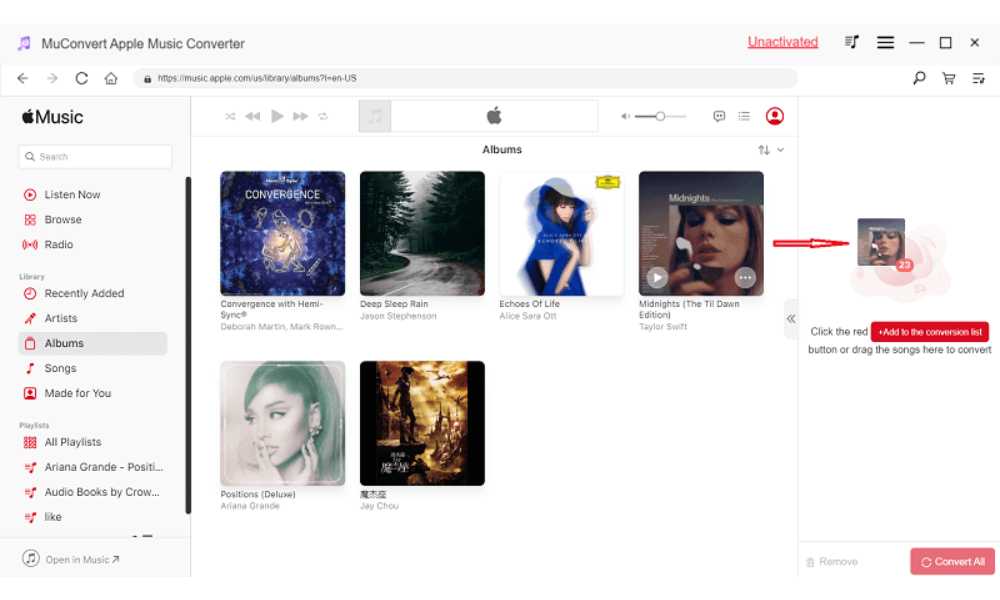
Step 2. Select the songs you want to convert. Drag and drop them onto the conversion list on the right side.
Step 3. Select the output format and other settings for your songs. Then click “Convert All” to start the process. Once the converting and downloading process is done, check your downloaded files in the “Finished” section.
Conclusion
You have come to the end of this review. All in all, MuConvert Apple Music Converter stands as a versatile and powerful tool to save songs from Apple Music. Whether you’re a casual listener, or someone who simply wants to enjoy your music library without limitations, MuConvert Apple Music Converter is your go-to software. Its reliable performance, safety, and trial availability make it a must-try. You can give it a try today and experience the true freedom of your music collection.