


High-Density Campus Wi-Fi Design requires prioritizing airtime efficiency over sheer access-point count. To stabilize performance during peak academic loads, engineers must audit client behavior, shrink cell sizes, optimize channel reuse, and enforce per-radio association limits. Implement RF Navigation to steer capable clients and validate roaming during actual class changes, ensuring backend services handle concurrent bursts seamlessly.
Campus wireless problems often appear as simple speed complaints, but dense academic environments expose critical performance and network security weaknesses for a specific reason: too many clients compete for the same shared airtime on each radio interface while core services are forced to handle large concurrent bursts. This pressure spikes during class changes and in lecture halls because client distribution, roaming behavior, and authentication workflows are under simultaneous stress.
Why High-Density Campus Wi-Fi Design Fails Under Load
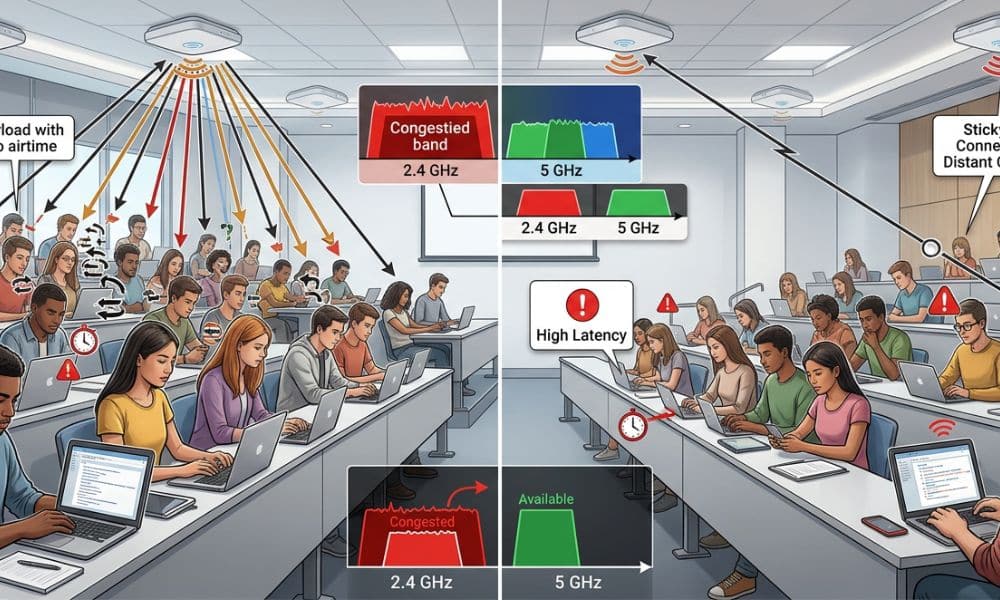
High-Density Campus Wi-Fi Design usually fails when coverage is treated as the main objective and airtime is treated as an afterthought. In dense WLANs, each AP radio operates on a shared medium, so adding more APs does not automatically improve the user experience if clients still associate unevenly or remain attached to inefficient cells.
A strong signal does not guarantee good performance
A campus user can see excellent signal strength and still experience poor throughput, delay, and instability because RSSI alone does not measure contention, retries, or sticky-client behavior. When too many devices remain on the same radio, or when low-efficiency clients stay connected longer than they should, the entire cell incurs airtime costs.
University traffic is unusually bursty
Campus WLANs behave differently from office networks because demand rises sharply at predictable times such as lecture starts, class dismissals, library rushes, and onboarding windows. That is why High-Density Campus Wi-Fi Design must account for synchronized client activity and roaming-heavy movement patterns rather than relying on light-load averages.
Evaluating Bottlenecks in High-Density Campus Wi-Fi Design
Proper planning prevents costly deployment mistakes, ensuring you solve the actual root cause of network congestion rather than just blindly adding random hardware to the ceilings.
Step 1: Audit the Existing Campus WLAN
A practical design guide should begin with verification, not assumptions. Before changing settings or adding hardware, the first step is to determine where the real constraint appears under load—whether that is airtime contention, roaming behavior, or the capacity of upstream services supporting the WLAN.
Measure the network at peak time
Do not assess the WLAN during quiet hours; assume the results reflect real user experience. High-density behaviour must be measured during live occupancy, especially in the time windows when complaints actually occur.
Check these items first:
- Client count per radio during peak occupancy.
- Airtime utilisation by AP and by band.
- Retry rate, latency, and retransmission trends.
- Band distribution for dual-band clients.
- DHCP, authentication, and reconnect behaviour during bursts.
Identify the first real bottleneck
If one classroom radio is overloaded while nearby radios remain underused, the problem is client distribution rather than insufficient hardware. If RF metrics look acceptable but users still struggle during mass reconnect events, DHCP, RADIUS, VLAN design, or onboarding behaviour may be the real failure point behind the Wi-Fi complaints.
Treat airtime as the design constraint
Cisco’s high-density guidance frames the AP radio as the basic unit of wireless capacity, which makes airtime—not total associations—the practical resource to protect. That design mindset changes the goal from “connect as many devices as possible” to “keep active users efficient under real load”.
Step 2: Improve RF Design, Cell Size, and RF Navigation
Control how clients enter and use the RF environment by aligning channel reuse, cell size, and steering behaviour.
Use channel width for reuse, not marketing speed
Deploy narrower channels to improve channel reuse and make it easier for nearby radios to coexist without excessive contention. This strategy is far more effective in crowded lecture halls than chasing wide-channel peak throughput.
Keep cells intentionally small
Reduce the effective cell size by configuring higher minimum mandatory data rates, which keep clients closer to the AP. Higher-rate transmissions occupy the medium for less time, drastically improving airtime efficiency.
Insider Tip: Disable lower legacy data rates entirely. In our experience deploying high-density lecture halls, setting the minimum mandatory data rate to 12 Mbps or even 24 Mbps on the 5GHz band is the quickest technical fix to cleanly shrink cell sizes and force sticky clients to roam gracefully.
Use RF Navigation to improve client steering
Position RF Navigation as an airtime-protection tool. Influence capable clients to move to the higher-capacity band when signal conditions are stable, while avoiding rigid steering that forces weak links. These congestion problems are far more complex than issues seen on a standard home network.
Step 3: Control Associations, Roaming, and Airtime Per Radio
High-Density Campus Wi-Fi Design becomes unstable when client associations are left almost entirely to chance. The network needs policy controls that protect airtime at the radio level, discourage inefficient attachments, and push roaming behaviour in a healthier direction during peak load.
Enforce per-radio association policy
Association limits are most effective when they protect the radio rather than the AP as a whole, because airtime is consumed on each radio interface rather than a single abstract device. Cisco’s high-density design examples show that practical user targets can be much lower than the platform’s maximum association counts, reinforcing the need to design for usable performance rather than headline capacity.
Use per-radio policy to achieve three goals:
- Prevent one crowded radio from collapsing under excess load.
- Encourage new clients to use nearby capacity instead of piling onto the first AP they detect.
- Preserve service quality for connected users instead of allowing universal degradation.
Pair RF Navigation with radio-level control
RF Navigation works best when it is not isolated from the rest of the design. In a dense campus WLAN, steering-capable clients and enforcing sensible per-radio limits together create a more predictable client distribution than either control used alone.
Tune roaming to reduce sticky clients
Cisco’s optimised roaming guidance focuses on preventing low-RSSI associations and removing clients whose signal and data-rate conditions no longer support an efficient connection. That makes roaming policy a core part of High-Density Campus Wi-Fi Design, because sticky clients consume shared airtime long after they stop being useful members of the cell.
Do not set a single RSSI threshold as a universal campus rule. Thresholds should be validated on-site using survey data, client behaviour, and classroom density, because the optimal roaming policy depends on the building, device mix, and AP layout rather than a single number copied from another environment.
Step 4: Fix the Network Services Behind the WLAN
Step 4: Fix the Network Services Behind the WLAN
RF design alone cannot stabilise a dense network if wired services fail during roaming bursts.
Segment traffic carefully
- Design thoughtful VLANs to reduce unnecessary broadcast propagation.
- Scale backend services like DHCP and RADIUS to match the wireless client base.
- Protect authentication paths to ensure rapid responses during mass reconnect events.
Step 5: Validate High-Density Design During Peak Load
The network is only finished when it remains stable during class changes and crowded lecture sessions.
Test where the pain actually happens
- Target lecture halls, libraries, and common areas during high occupancy.
- Verify that the WLAN behaves tangibly better after policy changes.
Achieve these specific results:
- Demonstrate a more even distribution of clients across radios and bands.
- Reduce retry rates during peak occupancy times.
- Eliminate sticky clients clinging to poor links.
- Stabilise latency during massive lecture transitions.
- Prevent backend DHCP or authentication timeouts during surges.
Frequently Asked Questions
What is High-Density Campus Wi-Fi Design?
High-Density Campus Wi-Fi Design is the process of building a campus WLAN around airtime efficiency, controlled client distribution, roaming behaviour, and scalable backend services, ensuring the network remains usable when many users connect at once.
Why is campus Wi-Fi slow even when signal bars look full?
Because signal bars show coverage, not airtime efficiency. A client can have strong RSSI and still perform poorly if the radio is overloaded, retries are high, or sticky clients are wasting shared airtime.
How does RF Navigation help with dense-campus Wi-Fi?
RF Navigation helps by steering capable clients toward the higher-capacity band when signal conditions are strong enough, while avoiding rigid behaviour that would push users onto unstable links and increase retransmissions.
Should universities limit the number of connected devices per AP?
In dense environments, it is usually more effective to protect airtime with per-radio policy than to allow unlimited associations and degrade performance for everyone on the cell. The objective is stable service for active users, not the highest possible visible client total.
Why does one AP per classroom still fail?
Because the AP count alone does not solve density. If channel reuse, cell size, RF Navigation, roaming behaviour, SSID overhead, and backend services are not tuned together, the classroom can still suffer contention, retries, and unstable throughput under load.