

You’ve possibly had to attend more than a few video conference calls if you’ve been working from home for the last few weeks. Or maybe you used video chat apps to stay in contact with friends and family while distancing yourself from society. You already found that the camera on your laptop is crap anyway. It creates blurred, pixelated video calls and unattractive angles of view.
There are some ways to tackle the problem. You might buy a proper webcam but fortunate enough to find one of those in stock. If you happen to have one lying around, you might repurpose an old smartphone and use it as a webcam. Both of those could be marginally better than the camera on your laptop.
But if you’d like to step up your video call game, you can really use your mirrorless or DSLR camera as a webcam and have the best-looking picture in your group chat.
Check out: Fujifilm’s X-Pro3 Digital Camera announced Officially.
It can be as easy as downloading a piece of software and then using a USB cable to connect your DSLR camera to your device, depending on your phone and computer. If you have a relatively new Canon camera and a Windows PC, an app is now available that allows you to connect the camera over regular USB to your device and use it as a webcam. Software-only solutions exist for other devices and Macs, but sadly they frequently require “virtual” webcams created by software that some apps can not be used, including Zoom.
Therefore the “easiest” approach requires spending some money. Most people probably would need additional hardware to convert the HDMI output of a camera to a USB connection. These products are referred to as USB capture cards and typically cost $100 or more. They are also tough to find on hand due to the global pandemic. But this IOGear model has been reviewed, and it works well. Unlike the famous Elgato Cam Connect, B&H Photo has the IOGear model available right now.
You also need an HDMI cable that can attach to your camera, which would mean a Micro HDMI at the end of the camera. You can either get a full-length Micro HDMI cable or an adapter that converts the larger HDMI plug to a Micro HDMI. When the camera is attached, you’ll want to allow “clean HDMI” output, which will eliminate all the camera exposure details and provide you with unlimited video feeding. This is either achieved by placing the camera in its video mode or by toggling an option in a settings menu, based on the camera you have. Please consult the manual on the way your camera does it on your setup.
In comparison to your computer’s USB capture tool or app, you’ll want a way to mount your camera for video calls as well. It can be as simple as a standard tripod, but if, like a popular webcam, you’re trying to put the camera above a screen display, things can get a little more complicated. You can buy mounts and clamps to connect the camera to your desktop and pull it up to eye level, but you’ll have to find out how you can get it to function in your situation. I operated with a GorillaPod wrapped around my computer arm, but it’s not the most stylish solution.
Eventually, because using your mirrorless or DSLR camera as a webcam ensures that it’s mostly on and continuously uploading a video to your device, you’ll want to get an A / C converter to power the camera instead of depending on its batteries. Some cameras can be charged via USB-C battery banks and chargers, while others require the manufacturer’s special A / C adapters. You’ll also want to disable all of the camera’s automatic power shutdown features. Consult the manual on your camera to see what you need.
Check out: Fujifilm X-T200 Mirrorless digital Camera With 24.2-Megapixel Sensor
Some other aspects to bear in mind:
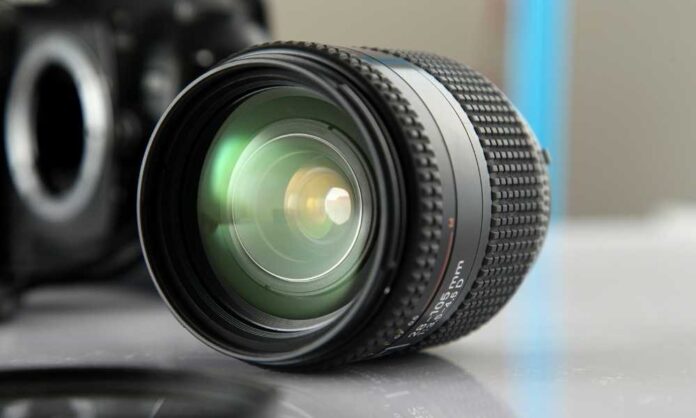
- Mostly the webcams have wide-angle lenses, so staying in the frame is easy. If you want to use this setup specifically for video calls, you’ll want to use the largest lens you have for your mirrorless or DSLR camera. Otherwise, your video calls will be all-face, and you’ll drift out of the frame constantly.
- You additionally need to use the fastest and best lens available to you. The slower the aperture (the number on your camera’s lens after the f/), the more your background looks blurred and friendly. You’ll want to be at least f/2.8, but that’s easier if you can go lower. For better effect, you should set your 16 mm Fujifilm lens to its lowest f/1.4 aperture.
- Your camera probably has face-detecting autofocus that you should activate. That way, if you change or adjust your seat, it just follows your face to stay focused. You will probably hear your lens trying to focus as it keeps a record of you, but chances are viewers do not listen to it on the other end of your video chats.
- Holding the camera continuously on and streaming live video to your computer for a longer time can hot the parts in your camera. In some cases, if it overheats, a camera can shut down. Switching your camera off in between calls is wise.
Check out: Fujifilm Instax Mini 11 instant camera specially designed for selfies
Setting the camera as easy as plugging the cable into the camera’s side, plugging the other end into the capture card, and then plugging it into your device and turning on your monitor. The camera will be automatically recognized as a webcam by both Windows and macOS. It will be available as an option in Zoom, Google Meet, FaceTime, or whatever other software you use for video calls. From there, you can bask from your overpriced camera into the glory of picture quality.