

How to Improve HTTP Response Header In WordPress

A text record information that a Web server transmits back to a client’s browser in response to receive an HTTP request. The HTTP response header includes file formate, size, and time that the server sends back to the client and data about the server itself. The header is attached to that file, returned to the client. In this article, we will discuss three methods.

Modify HTTP Response Header In WP Theme Source Code (header.php, function.php)

  1. Header.php

Install any WordPress theme editor if you don’t have a built-in function in your active Theme.

  • Click on Appearance — Theme Editor menu and select your WordPress Active Theme.
  • Select your WordPress website active Theme and select the header.php file.
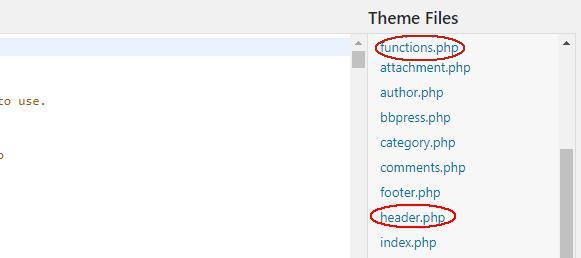
header.php and function.php


Add the below code at the beginning of the header.php file before <!DOCTYPE html>. This code makes use of the PHP header function to create or set related header values.

<?php
unset($headers['Vary']);
header('Vary:Accept-Encoding', true);
?>
<!DOCTYPE html>
<html <?php language_attributes( 'html' ); ?>>
<head>


Note:- Some lines in source code already exist. In that case, you have to copy extra lines from the given code to avoid duplication and conflicts.

2. Function.php

Find the function.php (the method is same as you installed them editor and located header.php)

Place the below code in the function.php

function replace_wp_headers($headers) {
  $headers['Vary'] = 'Accept-Encoding';
  return $headers;
}
add_filter('wp_headers', replace_wp_headers);

Note: – You can edit these files using an FTP client like Filezilla or through cPanel file manager. Some lines in source code already exist. In that case, you have to copy extra lines from the given code to avoid duplications and conflicts. You have to go to your website’s root directory > wp-content > themes > your active theme.

Check out: How to Stop DDoS Attacks on your WordPress website

3 .htaccess file

This method is not at all times functional because plugins can modify headers value PHP source code. Anyways if you want to use this method in any case. Just copy the below code in your .htaccess file and save.

<IfModule mod_headers.c>
   Header unset Vary
   Header set Vary "Accept-Encoding"
</IfModule>

.htaccess

Note:- .htaccess file is located in the website’s root directory, which can be accessed by using FTP client or cPanel. Always check your website’s functionality after adding any source codes. In any case, you find your website is not responding, remove the code, and save the file. This is just because, in some cases, the source codes don’t work because of any active plugin or “maybe you added the code which is missing any syntax.”

Most Popular

More From Same Category

- A word from our sponsors -

Read Now

Handling 410 Redirects for better SEO Implementation

In this comprehensive guide, we will walk you through all the essential steps to effectively implementing and  Handling 410 Redirects for SEO Improvement , and optimize your robots.txt file. These actions not only enhance your website's SEO performance but also improve the user experience by ensuring that...

Importance of Attractive and Quality web design

In the digital age, your website is often the first touchpoint between your brand and potential customers. Whether you're running a business, showcasing a portfolio, or blogging, the importance of quality web design cannot be overstated. A well-designed website creates a lasting impression, fosters trust, and provides...

6 Reasons Why You Are Not on the First Page of Google?

Getting your website on the first page of Google search results is a dream for any website owner or digital marketer. However, even with great SEO strategies, many websites still struggle to rank high on search engines. If you're wondering why your website isn't showing up on...

10 Reasons Why SEO for E-commerce Website is Important

E-commerce has revolutionized how businesses reach customers, but success in this space isn't guaranteed. Simply having an online store is not enough; without visibility, your products remain hidden in the vast sea of competition. That’s where SEO for e-commerce websites comes in. SEO (Search Engine Optimization) is the...

Fixing Yoast SEO Title and Meta Description Issues

Optimizing Yoast SEO Title and Meta Description Issues is essential for improving visibility in search engine results and increasing click-through rates (CTR). Yoast SEO, one of the most popular SEO plugins for WordPress, offers an easy-to-use tool to help you configure and customize these settings effectively. In...

Speed Up Your WordPress Website Using htaccess File

Optimizing website speed is crucial for both user experience and SEO rankings. One of the most effective methods to improve website performance is through the .htaccess file. This configuration file allows you to control server settings, enabling speed improvements for your website. In this modern guide, we'll...

Guide to Create Robots.txt: SEO Best Practices

SEO is constantly evolving, and understanding the Robots.txt file and how it affects your site's SEO is crucial for success. The robots.txt file is a simple text file that helps search engines understand which parts of your site should be crawled and indexed, and which parts should...

What is a Traffic Bot? Complete Information

A traffic bot is an automated program designed to generate fake or artificial website traffic. These bots simulate human users by clicking on links, visiting pages, and interacting with ads. While some traffic bots are used for malicious purposes, others may serve legitimate testing or analysis functions....

Guide to Fixing Pagination Issues with Yoast SEO

Pagination is common in large websites, such as blogs or product pages. However, pagination can create SEO issues like duplicate content or missing H1 tags. If not addressed properly, these issues can negatively affect rankings. In this guide I will shows you how to fix Pagination Issues...

How to Set Up 410 Redirects in Yoast SEO?

If you manage a website with outdated or removed content, properly implementing 410 redirects is crucial. These redirects help search engines know that a page is permanently gone, improving your site’s SEO and user experience. As a website owner, managing hundreds or even thousands of outdated URLs...

Yoast SEO Best Practices: Optimizing Your WordPress Site

Yoast SEO has long been one of the most popular SEO plugins for WordPress. It helps website owners improve their search engine rankings through on-page optimization. In 2025, Yoast continues to be a powerful tool, with new features and best practices emerging to keep up with ever-evolving...

How to Optimize TikTok Videos for SEO? A Comprehensive Guide

In the fast-evolving digital landscape, TikTok has become a powerful platform for content creators and businesses. But just posting videos isn’t enough to get noticed. Optimizing your TikTok videos for SEO is the key to expanding your reach and growing your audience. In this article, we’ll explore...