

In this guide, I will show you the complete HUAWEI S5700 SNMPv3 configuration process using the command-line interface (CLI). My goal is to make each step clear, so you feel supported throughout the process. I’ve performed this configuration on actual S5700 switches in production environments. And I will show you the commands I executed and the responses I received.
Understanding SNMPv3
SNMPv3 provides three critical security layers that work together, helping you trust the system’s comprehensive protection.
- SHA-256 authentication: Verifies “user identity” and “prevents attackers” from impersonating legitimate monitoring systems, giving you confidence in security reliability.
- AES-128 encryption: Scrambles message content, protecting “sensitive network data” from packet sniffing, so you can feel assured of data privacy.
- Different passwords: For authentication and encryption, if one credential is compromised, only that specific function is exposed.
Unlike SNMPv1 and SNMPv2c, which transmit credentials in plain text. SNMPv3 ensures complete confidentiality and authentication across networks. This makes SNMPv3 mandatory for production environments.
HUAWEI S5700 SNMPv3 Configuration: Complete CLI Guide
Access your HUAWEI S5700 through Putty (SSH).
STEP 1: Install WEAKEA Feature Pack
Prompt Level: ROOT PROMPT <HUAWEI>
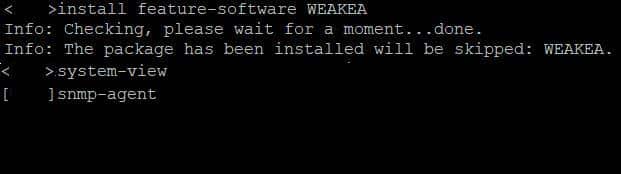
Some HUAWEI firmware versions disable SHA algorithms by default. WEAKEA enables these modern cryptographic algorithms.
Command:
<HUAWEI>install feature-software WEAKEA
Info: Checking, please wait for a moment...done.
Info: The package has been installed. WEAKEA will be skipped.
Important: Execute from root prompt <HUAWEI> (NOT system-view). One-time installation persists across reboots.
STEP 2: Enter System-View Mode
Prompt Level: ROOT PROMPT <HUAWEI>
<HUAWEI>system-view
System Response: Prompt changes from <HUAWEI> to [HUAWEI]
STEP 3: Enable SNMP Agent
Prompt Level: SYSTEM-VIEW [HUAWEI]
[HUAWEI]snmp-agentNote: SNMP agent is usually enabled by default on S5700 switches.
STEP 4: Create SNMPv3 Security Group
Prompt Level: SYSTEM-VIEW [HUAWEI]
Enter system-view and create a security group that defines the policy requiring both authentication and encryption.
Command:
[HUAWEI]snmp-agent group v3 libre-snmp-group privacy
System Response: Command completes with no output (normal behavior)
Important: The privacy keyword mandates both authentication and encryption (authPriv security level). Customize the group name as needed for your environment.
STEP 5: Create SNMPv3 User
Prompt Level: SYSTEM-VIEW [HUAWEI]
Create a user account and assign it to the security group. This username becomes the login credential for monitoring systems.
Command:
[HUAWEI]snmp-agent usm-user v3 librenms group libre-snmp-group
User Explanation: In this command, ‘librenms’ is the username being configured for SNMPv3 access. It’s an example name used to identify the user within the SNMP agent settings. You can change the username according to your preference or requirements.
Expected Output: Command completes, or you may see a warning
Warning (IGNORE):
Warning: Configuring a security algorithm is recommended,
because the noauthentication or authentication mode is insecure.
This is normal. The user exists but lacks authentication and encryption. Configure these immediately in the next steps.
STEP 6: Configure Authentication (SHA-256)
Prompt Level: SYSTEM-VIEW [HUAWEI]
Enable SHA-256 authentication and set a strong authentication password. This verifies user identity.
Command:
[HUAWEI]snmp-agent usm-user v3 librenms authentication-mode sha2-256
Expected System Response:
Please configure the authentication password (8-64)

Enter Password:
Action: Type your strong authentication password and press ENTER
Next Prompt:
Confirm Password:
Action: Re-enter the same authentication password and press ENTER
Example Password: MyS5700Auth@2025#Secure
Password Requirements:
- 8 to 64 characters
- Use uppercase, lowercase, numbers, and special characters
- Avoid dictionary words and predictable patterns
- Different from encryption password (recommended)
Expected Output:
Info: Succeeded in configuring the authentication password.
STEP 7: Configure Encryption (AES-128)
Prompt Level: SYSTEM-VIEW [HUAWEI]
Enable AES-128 encryption and set a strong encryption password. This protects message content from eavesdropping.
Command:
[HUAWEI]snmp-agent usm-user v3 librenms privacy-mode aes128
Expected System Response:
Please configure the privacy password (8-64)
Enter Password:
Action: Type your encryption password (DIFFERENT from authentication password) and press ENTER
Next Prompt:
Confirm Password:
Action: Re-enter the same encryption password and press ENTER
Example Password: PrivacyKey@2025#AES128Encrypt
Password Requirements:
- 8 to 64 characters
- Use uppercase, lowercase, numbers, and special characters
- DIFFERENT from SHA-256 authentication password
- Unique and non-predictable
System Response (if using same password for both):
Warning: The privacy and authentication passwords are the same,
which is insecure. It is recommended that the privacy and
authentication passwords are different.
System Response (if using different passwords):
Info: Succeeded in configuring the privacy password.
STEP 8: Exit System Configuration
Prompt Level: SYSTEM-VIEW [HUAWEI]
[HUAWEI]quit
System Response: Prompt returns to ROOT PROMPT <HUAWEI>
STEP 9: Verify Configuration
Prompt Level: ROOT PROMPT <HUAWEI>
Confirm all components are properly configured before saving.
Command:
<HUAWEI>display snmp-agent usm-user
Expected Output:
Engine ID: 800007DB032053835201E5 active
Authentication Protocol: sha2-256
Privacy Protocol: aes256
Group name: v3group
State: Active

User name: librenms
Engine ID: 800007DB032053835201E5 active
Authentication Protocol: sha2-256
Privacy Protocol: aes128
Group name: libre-snmp-group
State: Active
Verification Checklist:
- ✓ User name: librenms (You can change user name)
- ✓ Authentication Protocol: sha2-256
- ✓ Privacy Protocol: aes128
- ✓ Group name: libre-snmp-group (You can change the group name)
- ✓ State: Active
Action: If all five elements match above, configuration is complete and correct.
STEP 10: Save Configuration
Prompt Level: ROOT PROMPT <HUAWEI>
Make configuration permanent across device reboots.
Command:
<HUAWEI>save
System Prompt:
The current configuration will be written to the device.
Are you sure to continue?[Y/N]
Action: Type y and press ENTER
Expected Output:
Info: The current configuration has been saved successfully.
Important: Configuration is NOT permanent until saved. Without this step, changes revert after reboot.
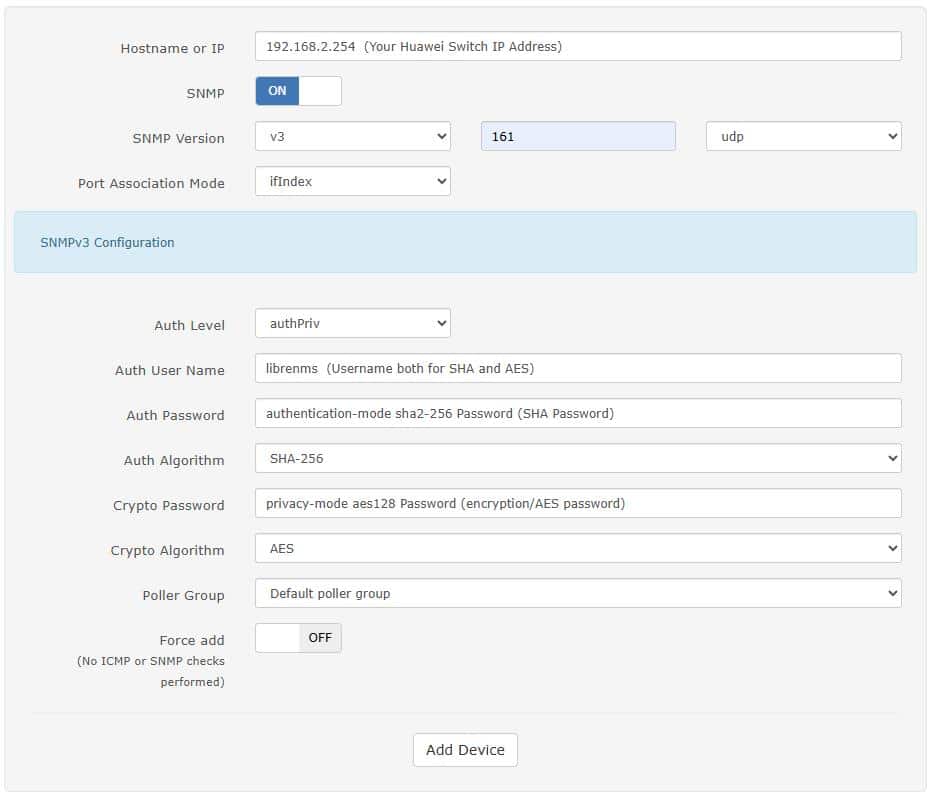
Now, go to your monitoring tool (LibreNMS in my case,) and add your device. Fill in the required fields and save. See the image below!
Conclusion
Configuring SNMPv3 on HUAWEI S5700 switches establishes enterprise-grade network monitoring with robust security. This guide covers the essential commands and configurations needed for production deployment.
Key achievements: SHA-256 authentication verifies user identity. AES-128 encryption protects sensitive network data. Separate passwords compartmentalize security risk. ACLs restrict SNMP access to authorized systems. LibreNMS integration enables comprehensive network monitoring.
The complete configuration takes approximately 15-20 minutes and provides security suitable for enterprise production environments. Regular password rotation, log monitoring, and security audits maintain the protective measures over time.
Your S5700 switch now supports secure SNMPv3 monitoring, protecting critical network infrastructure from unauthorized access and data interception. This configuration aligns with industry best practices and security standards for network device management.
Check out: How to Enable SNMP on Huawei AirEngine AP Using CLI Mode