


When it comes to speeding up your website and reducing server stress, cache rules play a huge role. If you’re using Cloudflare’s free plan, you might wonder how to make the most of its caching features. Let’s take a friendly walk through three essential Cloudflare cache rules that can make a visible difference—and why they matter. All the Cloudflare Cache Rules strategies and examples in this guide are fully tested and confirmed to work on Cloudflare’s Free plan. You do not need a paid subscription to achieve a massive performance boost. Also see the Cloudflare Custom WAF rules to secure your website.
Understanding Cloudflare Cache Rules
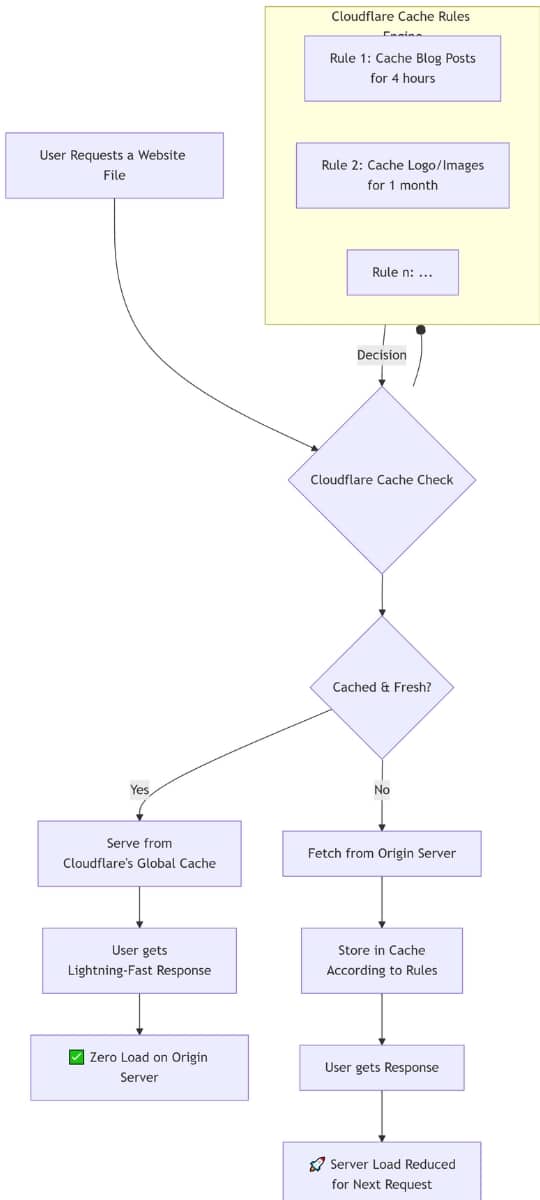
Think of Cloudflare cache rules as smart assistants for your website’s content. They decide what gets stored where and for how long. When someone visits your site, these rules determine whether they’ll get lightning-fast content from a nearby server or wait for it to load from your main server.
Cloudflare cache rules create specific instructions that tell the system which files to cache, where to store them, and when to refresh them. It’s like organising your home—you put frequently used items in easy-to-reach places and store seasonal stuff further away.
The beauty of cache rules lies in their flexibility. You can create different rules for different types of content. Maybe you want blog posts cached for hours, but your logo cached for months. With Cloudflare’s free plan, you get up to 10 cache rules—plenty for most websites to see dramatic speed improvements.
What makes cache rules powerful isn’t just speed—they reduce server load too. When visitors access cached content, they’re not hitting your server directly. This saves bandwidth and keeps your site running smoothly during traffic spikes.
Rule 1: Cache All Static Assets
Imagine your website as a busy library. Every time someone asks for a book (or in this case, a file like a CSS style sheet, JavaScript file, image, or font), the librarian (your server) runs to fetch it from the back room. What if the librarian could leave some of these books right at the front desk? That’s exactly what caching static assets does.
This rule tells Cloudflare to cache common static files like .css, .js, .jpg, .png, .woff2, and others for up to one month on Cloudflare’s edge servers and one year in the user’s browser. By keeping these resources close, your website loads faster, especially for returning visitors. And because these files rarely change, it’s a smart way to save time and bandwidth without risking outdated content.
expression:
(
ends_with(http.request.uri.path, ".css") or
ends_with(http.request.uri.path, ".js") or
ends_with(http.request.uri.path, ".jpg") or
ends_with(http.request.uri.path, ".png") or
ends_with(http.request.uri.path, ".webp") or
ends_with(http.request.uri.path, ".woff2") or
ends_with(http.request.uri.path, ".ttf") or
ends_with(http.request.uri.path, ".svg") or
ends_with(http.request.uri.path, ".gif") or
ends_with(http.request.uri.path, ".ico")
)
Actions:
- Eligible for cache
- Edge TTL: one month
- Browser TTL: one year
Rule 2: Homepage Cache for Freshness
Your homepage is like a window display—it needs to look inviting but also stay updated. This cache rule targets the homepage specifically (for example, on techsaa.com), keeping a balance between speed and freshness.
Cloudflare caches your homepage for 2 hours on the edge and 4 hours in browsers. Why not longer? Because the homepage often changes—maybe you add a new article or update a banner. With these shorter caching times, new visitors still experience quick loading times without missing out on the latest updates.
Expression:
(http.host eq "yourdomain.com" and http.request.uri.path eq "/")
Actions:
- Eligible for cache
- Edge TTL: 2 hours
- Browser TTL: 4 hours
Rule 3: Article URL Cache
Now, let’s talk about those important interior pages where your visitors spend most of their time—your articles or blog posts. This rule caches these pages to speed up access for users who aren’t logged in, while excluding admin and login pages that shouldn’t be cached for security reasons.
The cache lives for 2 hours on Cloudflare’s edge servers and 4 hours in the browser. This setup offers a great mix: visitors get fast access without you having to worry about showing stale or personalized content. It’s a neat way to keep things moving fast while protecting sensitive areas of your site.
Expression:
(
http.host eq "yoursite.com"
and http.request.uri.path ne "/"
and not starts_with(http.request.uri.path, "/wp-admin")
and not starts_with(http.request.uri.path, "/wp-login")
and not (http.cookie contains "wordpress_logged_in_")
)
Actions:
- Eligible for cache
- Edge TTL: 2 hours
- Browser TTL: 4 hours.
Why These Cloudflare Cache Rules Matter
You might be thinking, “Is all this really necessary on a free Cloudflare plan?” Absolutely! These cache rules help you squeeze maximum performance out of Cloudflare’s free tier. By strategically caching static assets, homepages, and article pages, you reduce server load, speed up page delivery, and improve the user experience—all without spending a dime.
Plus, faster sites tend to keep visitors around longer and rank better on search engines. That’s a win-win, right?
How to Test if Cloudflare Cache Rules Are Working for Your Site
If you have implemented the rules above for your site using Cloudflare’s Cache Rules (Free Plan), it’s time to test them to see if they are working and enhancing your site’s performance.
1. Test Static Assets
Press the Windows + R keys, type cmd, and press Enter to open the Command Prompt. Run the following curl command for a static asset, such as a .jpg, .webp, .woff file, or any other static file, using its complete URL.
curl -I https://yoursite.com/wp-content/uploads/example.jpg
You will see a result like the one below. If your result does not match, it may indicate an error in your rule configuration.
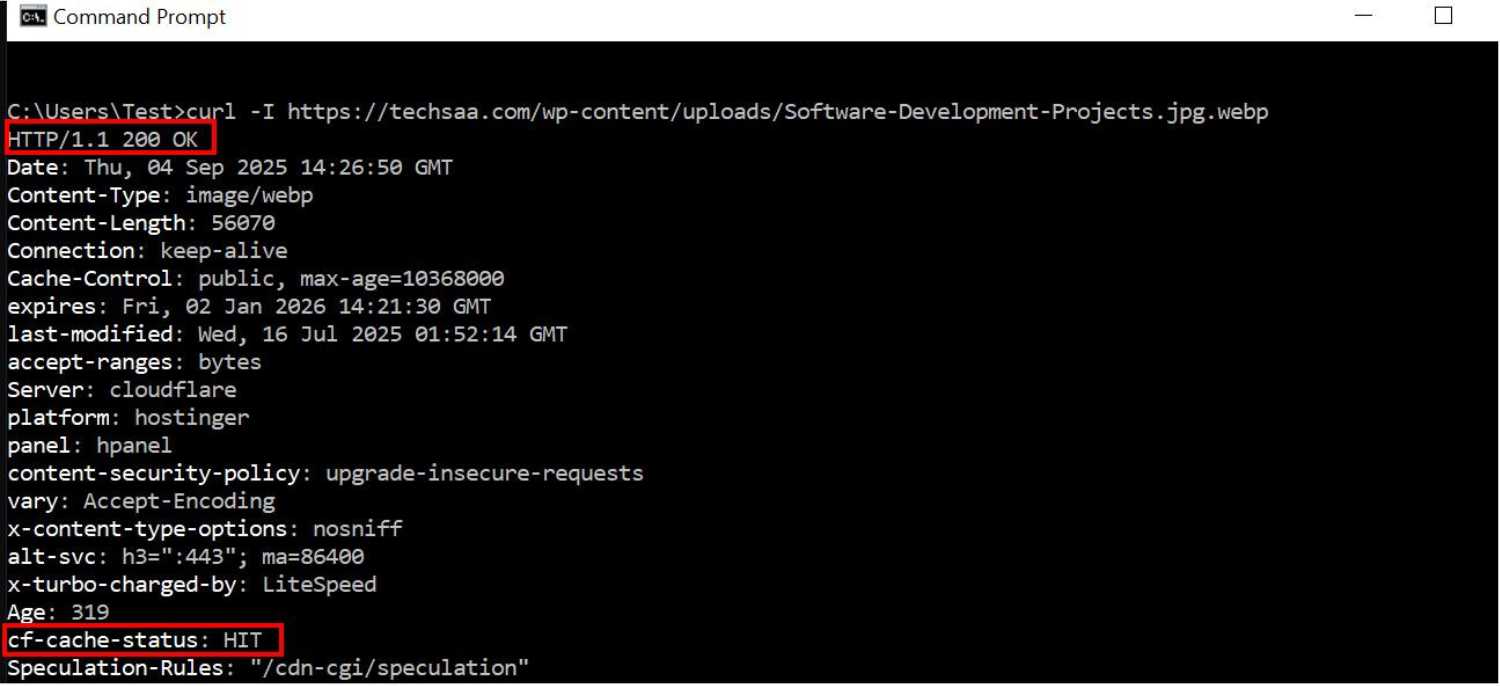
Same as the above test you can test your website’s root URL, pages or directories URLs or article URLs. If you don’t see the “cf-cache-status: HIT, try again, 2nd or third time you will see the correct result.
Note: You must purge cloudflare cache, and WordPress Plugin Cache like wp-rocket or wp super cache etc to get appropriate results.
Wrapping It Up: Mastering Cloudflare Cache Rules on the Free Plan
To sum it up, these Cloudflare cache rules make a remarkable difference:
- They place static assets close to visitors for lightning-fast load times.
- They keep your homepage fresh but snappy.
- They optimize article delivery while protecting secure areas of your site.
Embracing these Cloudflare cache rules on the free plan taps into the power of smart caching without complex setups. It’s like giving your website a faster engine with less fuel consumption.
Remember, a smooth site today means happier visitors tomorrow. And with Cloudflare on your side, you’re already ahead of the game.
Conclusion
Implementing these Cloudflare cache rules on the free plan offers a smart, practical way to boost your website’s speed and efficiency. By caching all static assets for longer periods, your visitors enjoy faster load times with less strain on your server. The targeted caching of your homepage keeps key content fresh without sacrificing performance, and caching article URLs smartly balances speedy access with secure, dynamic content exclusion.
These rules show how powerful the Cloudflare free plan can be when configured thoughtfully. Not only do they improve user experience through quicker page loads, but they also reduce bandwidth costs and server load—benefits that every website owner, big or small, will appreciate.
With Cloudflare cache rules set up in this order and properly optimised, you give your website the best chance to perform well, rank higher, and keep visitors coming back. Why settle for average performance when a few well-placed cache rules can make your site fly?