


Hardware Firewall: Strong at the Edge, Weak When the Edge Is Exposed
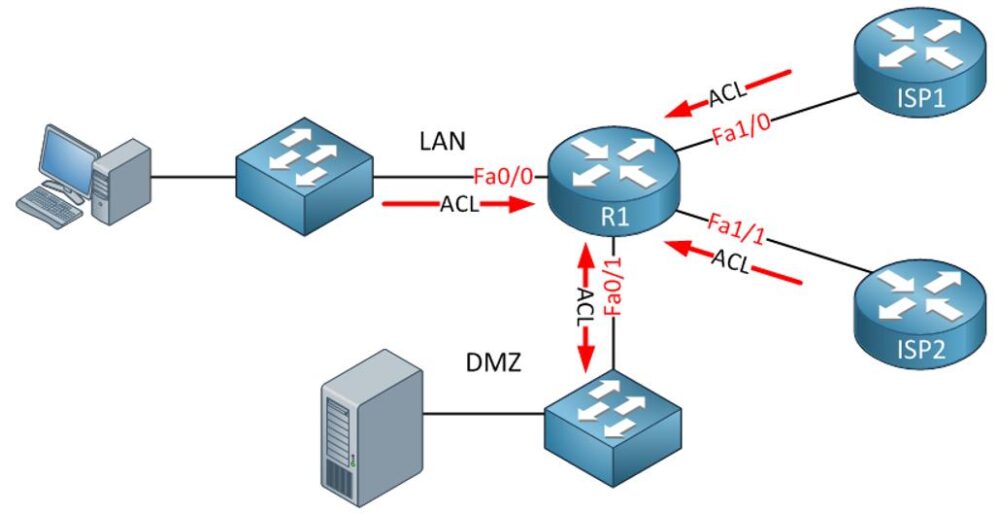
A hardware firewall is usually placed at the boundary of a network. It filters traffic before that traffic reaches internal computers, servers, cameras, printers, or other devices. Cisco’s Secure Firewall documentation treats firewall appliances as part of a wider ecosystem that includes management, threat defense, ASA, IPS, VPN, and troubleshooting, which reflects how modern hardware firewalls are used beyond basic packet blocking.
Modern business firewalls are no longer basic packet filters; many now include IPS, application control, VPN inspection, and advanced threat detection, which is why next-generation firewall architecture matters in modern network security.
trusted or manually configured.
But this is also where the scar appears: the hardware firewall becomes the front door of the company. If that front door exposes VPN, web management, SSO, or outdated firmware, attackers do not need to “break through” the firewall in a movie-style way. They attack the firewall itself.
In January 2025, reports around Fortinet CVE-2024-55591 described active exploitation of FortiOS and FortiProxy authentication bypass, where attackers could gain super-admin access, create rogue accounts, change firewall policies, and establish VPN tunnels for lateral movement.
That incident shows the uncomfortable truth: a hardware firewall can become the attacker’s entry point if management access, patching, and monitoring are weak.
Software Firewall: Better Endpoint Control, But It Lives on the Same Machine It Protects
A software firewall runs on the endpoint or server. It controls traffic locally, often by application, port, profile, or process. Microsoft includes Windows Firewall within its Windows security documentation, which makes sense because host-based firewalling belongs close to the operating system and endpoint behavior.
This is where software firewalls are valuable. A hardware firewall may allow outbound HTTPS traffic because most businesses need web access. A software firewall can still restrict which application is allowed to make that connection. That matters for laptops, remote users, developer machines, servers, and systems that move between networks.
The problem is dependency. A software firewall protects the same device it runs on. If malware gets administrator-level control, the firewall can be disabled, modified, or bypassed. This is why relying only on software firewall rules is weak when endpoint hardening, least privilege, and EDR are missing.
Software firewalls are useful, but they are not a rescue plan after compromise. They work best before the endpoint is infected, not after malware is already running with enough permission to change local security settings.
Real Firewall Bypass Patterns Seen in Recent Attacks
Firewall bypass does not always mean attackers defeated packet filtering. In many real incidents, attackers bypass firewall protection by abusing the services attached to the firewall: VPN, SSO, management interfaces, weak credentials, exposed portals, or old firmware.
In 2025, a large brute-force campaign reportedly used up to 2.8 million IP addresses to target VPN and firewall logins, including edge devices from vendors such as Palo Alto Networks, Ivanti, SonicWall, and others. The campaign focused on exposed login surfaces rather than “breaking encryption,” which is exactly how many real-world intrusions start.
Cisco ASA and Cisco Secure Firewall Threat Defense also had serious 2025 attention around VPN web server vulnerabilities. NVD describes CVE-2025-20362 as a vulnerability that could allow an unauthenticated remote attacker to access restricted VPN-related URL endpoints through crafted HTTP(S) requests.
This is the part many firewall comparison articles miss: attackers often go after the control plane, not only the traffic plane.
The common bypass paths are:
- Exposed firewall or VPN admin interfaces
- Weak, reused, or brute-forced credentials
- Unpatched firewall/VPN vulnerabilities
- Over-permissive “temporary” allow rules
- Trusted outbound traffic used for command-and-control
That is why “we have a firewall” is not a complete security answer. The better question is: who can reach the firewall, who can log in, and who reviews what changed?
Hardware Firewall vs Software Firewall: The Real Difference
The difference between a hardware firewall and a software firewall is mostly about placement and visibility. A hardware firewall sees traffic at the network boundary. It is better for protecting many systems at once, enforcing segmentation, handling VPN access, and controlling traffic between networks. Netgate pfSense documentation, for example, covers firewall rules alongside NAT, routing, VPN, multi-WAN, high availability, monitoring, logs, and diagnostics, which shows how appliance-style firewalls often become central network control points.
A software firewall sees traffic at the device level. It is better for local application control, endpoint-specific rules, and protecting laptops or servers when they are outside the trusted office network. The mistake in most hardware firewall vs software firewall comparisons is treating both as competitors. They are not competitors. They are two different control points.
A hardware firewall may stop unwanted inbound traffic before it reaches a workstation. A software firewall may stop a suspicious local application from calling out even when outbound web traffic is allowed at the edge. Both can fail if rules are lazy, logs are ignored, or updates are delayed.
Advantages of Hardware Firewall
The main advantage of a hardware firewall is centralized protection. In a business network, it is not practical to depend only on individual users maintaining firewall settings on every device. A hardware firewall gives administrators a single place to enforce network policy, inspect traffic, manage VPN access, and separate sensitive systems from general user devices. This becomes important when the environment has servers, guest Wi-Fi, IP cameras, point-of-sale systems, or remote access users.
The strongest use cases are business networks, branch offices, data centers, and networks where multiple devices need consistent protection. But the advantage becomes a weakness if the appliance is treated as “set and forget.” Firewall appliances need patching, configuration review, backup control, log monitoring, and restricted management access. Otherwise, the same device protecting the network can become the most valuable target on the network.
Disadvantages of Hardware Firewall
Hardware firewalls are expensive compared with software firewalls. The real cost includes licensing, support, skilled configuration, firmware maintenance, and sometimes high-availability appliances. They can also create a false sense of safety. I have seen environments where the firewall was enterprise-grade, but the rules were years old. Old VPN users were still active. Temporary port openings were never removed. Admin access was exposed too broadly. The hardware was strong, but the policy was weak.
Hardware firewalls are also not enough for endpoint behavior. If a user downloads malware, or if a laptop is compromised outside the office, the edge firewall may not see the full story. Once the device reconnects, internal movement can happen through traffic that looks normal unless segmentation and endpoint controls are also in place.
Advantages of Software Firewall
The biggest advantage of a software firewall is local control. It can apply rules directly on the device, which is useful when that device moves across networks or runs applications needing specific controls.
For remote work, this matters more than before. A laptop is not always behind the office firewall. It may connect through home routers, hotel Wi-Fi, mobile hotspots, or client networks. In those cases, the software firewall becomes the first practical layer of network control. Software firewalls are also easier to deploy at small scale. Built-in operating system firewalls are often enough for basic endpoint protection if they are enabled, configured, and not constantly overridden by users.
Disadvantages of Software Firewall
The weakness of a software firewall is trust in the local machine. If the endpoint is already compromised, a local firewall may no longer be reliable. Software firewalls can also become inconsistent. One device may have strict rules, another may have open exceptions, and another may have the firewall disabled because an application “was not working.” This is common in small offices with no central management.
Performance impact is less of a problem on modern machines than it used to be, but poorly configured security suites can still slow systems down. The bigger issue is not performance; it is rule discipline. A software firewall without central policy is better than nothing, but it is not the same as managed endpoint security.
Which Firewall Should You Use?
For home users, a router-level firewall plus the built-in operating system firewall is usually enough. Buying an enterprise hardware firewall for a normal home setup is often unnecessary unless the user is learning networking, hosting services, running a lab, or needs advanced VPN and segmentation. For small businesses, hardware firewall protection becomes more important because the network usually includes multiple users, shared devices, remote access, and business data. But that hardware firewall should not replace endpoint firewalls. It should sit above them as the network control layer.
For larger organizations, both are required. The hardware firewall protects the network edge and internal zones. The software firewall protects endpoints and servers individually. The practical rule is simple: use hardware firewalling where traffic enters or moves across the network, and use software firewalling where applications and users actually operate.
What Does Not Work Anymore
The weakest firewall strategy is still the most common one: install a firewall, open the ports needed to make things work, and never review the rules again.
That does not work anymore. Attackers actively scan for exposed edge services, exploit known vulnerabilities, brute-force VPN portals, and abuse old credentials. SA’s KEV catalog exists because many vulnerabilities are not theoretical; they are known to be exploited in the wild.
Also, “default deny inbound” is not enough when outbound traffic is open, VPN users are overprivileged, or firewall logs are never reviewed. A firewall that only blocks obvious inbound noise may still allow data theft, malware callbacks, and lateral movement. The stronger approach is boring but effective: restrict management access, patch quickly, remove old rules, monitor configuration changes, enforce MFA on remote access, and keep endpoint firewalls enabled.
Practical Firewall Decision
If the environment has only a few personal devices, start with the built-in software firewall and a properly configured router firewall. If the environment has business users, shared systems, remote access, or sensitive data, use a hardware firewall and keep software firewalls enabled on endpoints. If the environment has compliance needs, servers, multiple VLANs, guest networks, or exposed services, use both layers with logging, segmentation, and regular rule review.
Advantages of Hardware Firewall
The main advantage of a hardware firewall is centralized protection. In a business network, relying on every user or every device to maintain firewall settings is not practical.
A hardware firewall helps administrators:
- Enforce network-wide security policies from one place.
- Inspect traffic before it reaches internal devices.
- Manage VPN access for remote users.
- Separate sensitive systems from general user devices.
- Protect mixed environments such as servers, guest Wi-Fi, IP cameras, POS systems, and branch networks.
This is why hardware firewalls are most useful in business networks, branch offices, data centers, and environments where many devices need consistent protection.
But this advantage becomes a weakness if the appliance is treated as “set and forget.” A hardware firewall still needs regular patching, rule review, configuration backups, log monitoring, and restricted management access. Otherwise, the same device protecting the network can become the most valuable target for attackers.