
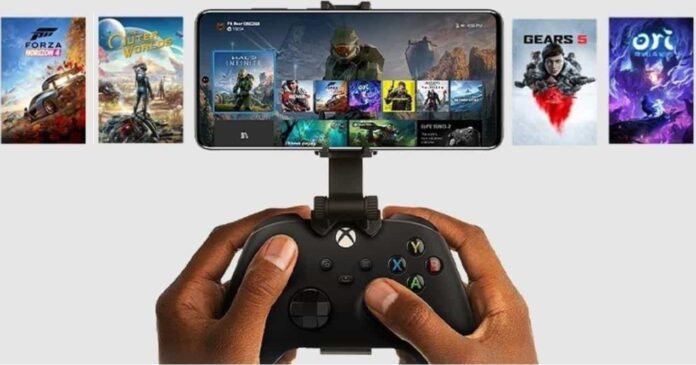

In 2025, Xbox app games have transformed the gaming landscape, offering players unprecedented access to a vast library of titles across multiple devices. Whether you’re at home or on the go, the Xbox ecosystem ensures a seamless gaming experience. This article delves into the features and benefits of Xbox app games, highlighting how they cater to both casual and hardcore gamers.
What Are Xbox App Games?
Xbox app games refer to titles accessible through the Xbox app, which is available on various platforms, including Windows PCs, smartphones, and smart TVs. These games can be played via cloud gaming or remote play, depending on your setup.
Key Features of Xbox App Games
1. Xbox Cloud Gaming
Xbox Cloud Gaming allows you to stream games directly from Microsoft’s servers to your device, eliminating the need for high-end hardware. With a Game Pass Ultimate subscription, you can access a vast library of games without downloading them.
2. Game Pass Ultimate
Game Pass Ultimate is a subscription service that provides access to over 100 high-quality games, including new releases, on console, PC, and mobile devices. It also includes EA Play, offering additional perks and discounts.
3. Cross-Device Play
One of the standout features of Xbox app games is the ability to play across different devices. Start a game on your console, continue on your PC, and pick up where you left off on your smartphone.
How to Play Xbox App Games on Mobile Devices
Playing Xbox games on your mobile device is straightforward:
- Download the Xbox App: Install the Xbox app from the App Store (iOS) or Google Play Store (Android).
- Sign In: Log in with your Microsoft account associated with your Game Pass Ultimate subscription.
- Select a Game: Browse the Game Pass catalog and choose a game to play.
- Connect a Controller: Pair a compatible Bluetooth controller to your device for optimal gameplay.
- Start Playing: Tap on the game to start streaming via cloud gaming.
Xbox App Games on Smart TVs
Recent developments have made it possible to play Xbox games directly on smart TVs:
- LG Smart TVs: Models running webOS 24 or newer can access the Xbox app, allowing users to stream games without a console.
- Amazon Fire TV: Fire TV Stick users can now play Xbox games through cloud gaming, provided they have a Game Pass Ultimate subscription and a compatible controller.
Advantages of Xbox App Games
- Accessibility: Play your favorite games anywhere, anytime, on various devices.
- Cost-Effective: Game Pass Ultimate offers access to a vast library of games for a monthly fee, eliminating the need to purchase individual titles.
- Convenience: Cloud gaming removes the need for downloads and installations, allowing for instant play.
Popular Xbox App Games in 2025
Some of the top games available through Xbox app games include:
- Fortnite: A battle royale game that continues to captivate players worldwide.
- Forza Horizon 5: An open-world racing game offering stunning visuals and a vast selection of cars.
- Halo Infinite: The latest installment in the iconic Halo series, featuring an expansive campaign and multiplayer modes.
- Minecraft Dungeons: An action-adventure game set in the Minecraft universe, offering cooperative gameplay.
Tips for Optimizing Your Xbox App Gaming Experience
- Stable Internet Connection: Ensure you have a strong and stable internet connection for smooth gameplay.
- Compatible Controller: Use a compatible Bluetooth controller for better control and comfort.
- Regular Updates: Keep your Xbox app and device firmware up to date to access the latest features and improvements.
Conclusion
Xbox app games have revolutionized the gaming experience, offering flexibility and convenience to players. With features like cloud gaming, cross-device play, and a vast game library, Xbox ensures that gaming is accessible to everyone, regardless of their device. Whether you’re a casual gamer or a hardcore enthusiast, the Xbox app provides a platform that caters to all.
Real User Experiences with Xbox App Games
1. Xbox App on Windows: A Frustrating Experience
Many users have expressed dissatisfaction with the Xbox app on Windows PCs. Common issues include:
- Installation Errors: Users frequently encounter error codes like
0x80070002and0x80070490when attempting to install games. - Download Speed Fluctuations: Significant variations in download speeds, often much slower than other platforms like Steam, have been reported.
- Unwanted Game Listings: The app sometimes displays games from older consoles (e.g., Xbox 360) that are unplayable on the current system.
These issues have led some users to consider alternatives or express frustration with the app’s performance.
2. Xbox Cloud Gaming: Mixed Feedback
While Xbox Cloud Gaming offers the convenience of playing games on various devices without a console, user experiences vary:
- Latency Concerns: Some users experience noticeable input lag, especially when using devices like the Amazon Fire TV Stick 4K Max with Bluetooth controllers.
- Audio Issues: On certain devices, users have reported problems with microphone functionality during gameplay.
- Device Compatibility: Not all devices support Xbox Cloud Gaming, and some users have requested official apps for platforms like Android TV and Fire Stick.
3. Xbox Game Pass Ultimate: Value and Limitations
Xbox Game Pass Ultimate provides access to a vast library of games across Xbox consoles, PC, and mobile devices. However, users have pointed out:
- App Navigation: The integration of various features into a single app has made navigation more complex for some users.
- Service Consolidation: The shutdown of the standalone Xbox Game Pass mobile app means users now access all features through the main Xbox app.
Suggestions from the Community
To enhance the Xbox app gaming experience, users have proposed:
- Improved App Stability: Addressing installation errors and download speed inconsistencies
- Enhanced Device Support: Developing official apps for platforms like Android TV and Fire Stick.
- Better Microphone Integration: Ensuring seamless voice chat functionality across all supported devices.
- Streamlined Navigation: Simplifying the app interface to make it more user-friendly.
Check out: A First Look At Ray Tracing On the Xbox Series S
Final Thoughts
While Xbox app games offer a convenient and expansive gaming experience, certain challenges persist. User feedback highlights areas for improvement, particularly concerning app stability, device compatibility, and navigation. Addressing these concerns could further enhance the overall gaming experience for users.
Check out: Best PS5 Accessories You Can Buy Today