


PowerPoint slides are the go-to tool for providing supporting content that helps audiences absorb and connect with the thoughts and ideas delivered in a presentation, from classrooms to boardrooms. By including audio narration in your PowerPoint presentation, you can capture the audience’s attention and encourage them to share your content with others.
You can either record your audio inside the PowerPoint program or use screen recorder software if you want to make the most out of your presentation. In this guide, you’ll learn to record PowerPoint presentations with audio using the best online tool.
SOOMUS – The Best Tool to Record Powerpoint Presentations with Audio
While recording the audio inside a PowerPoint presentation will generate a solid presentation, it bears one major flaw: it cannot effectively engage your audience. If you want to master the best way of recording PowerPoint presentations with audio, use SOOMUS video presentation software.
SOOMUS is one powerful PowerPoint presentation and recording tool currently available. Ease of use is one of its huge selling points, enabling users to create and record PowerPoint presentations without previous experience.
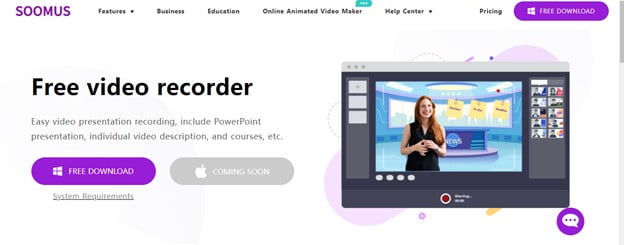
The most effective online presentations will show both your PowerPoint slides and your audio presentation. Using SOOMUS, you can customize the video and audio settings from eye contact to body language and let the viewer feel they are in the room. These solid functional features will attract your audience’s attention, boost comprehension and their memory to remember essential presentation points.
Use SOOMUS to keep your team informed about the company’s policies, announcements, sales progress, monthly briefs, and training materials, all while maximizing fun and engagement.
To record and support your end-of-year PowerPoint report navigate to Import PPT SOOMUS’s button and show sales growth and market potential.
What Makes SOOMUS the Best Powerpoint Video and Audio Presentation Software?
SOOMUS has the best-advanced features that help users to record audio-video PowerPoint presentations. They include:
Easy-to-use interface: Users can easily record Powerpoint presentations with no technical skills. Simply use the drag and drop functionality to add characters, captions, and background changes with SOOMUS intuitive interface.
PPT file importing: SOOMUS versatility, designed specifically for video and audio recording and conference, enables users to import PowerPoint presentations right from the launching window or within the editing mode.
A huge stack of templates: Record your PPT audio and video presentation quicker using SOOMUS’s multiple pre-made templates and customize them to suit your project.
Interactive virtual background: SOOMUS’s virtual background can help preserve your privacy anywhere anytime while making the video part of your presentation engaging.
Multiple video-conferencing software: Even better, SOOMUS supports connection to all the video-conferencing software, so you can choose what works best for you from ZOHO, Skype, DISCORD, LARK, Voow Meeting, and ZOOM.
Rich premium library: SOOMUS comes equipped with many effects, including animated graphics, intros, outros, pictures, captions/ text, annotations, whiteboard animations, voiceovers, and sounds. You can also add personal files such as images, music, or video clips.
HD high-quality recording: You don’t need third-party hardware to record premium quality audio and video. SOOMUS’s cutting-edge design helps users balance colours, remove background noises, and boost the overall PPT video quality.
Easy publishing and social sharing: Publish and share the presentation video on YouTube and other supported social media right through the SOOMUS dashboard.
Multiple video modes: Use SOOMUS to record a full video screen or constrain your image to a small window. Easily zoom in and out or switch between several presentation modes to capture your presentation goals.
How-to Professionally Record Your PowerPoint Presentations with Audio
Record PowerPoint presentations with audio and video using SOOMUS, the most advanced free video and screen recorder available today. Click here to start recording your PowerPoint presentation with SOOMUS or follow the instructions provided by SOOMUS below to record audio.
Requirements:
- Quiet location without distraction noises like kids, pets, and outside noises.
- A microphone records either a headset or a built-in device.
- Laptop or PC
- with a built-in webcam
- A working sound card or built-in audio
Steps to use SOOMUS
Step 1: Simply launch SOOMUS in your computer browser, download, and install to get started in minutes.
Step 2: Create a SOOMUS account with your credentials and follow the instructions on the screen. Proceed to sign in using your Google or Facebook account or just click the login button.
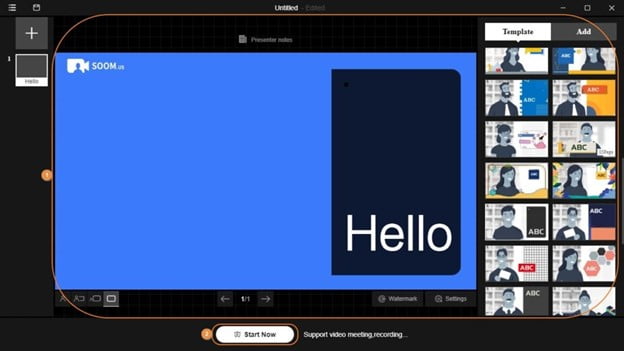
Step 3: Hit the Import button in the lower section, import your PowerPoint slides directly into SOOMUS. Or click Add on the top-right side, open PPT to import PPT within editing mode. Choose from many templates to customize your slides by adding pictures, texts, annotations, and virtual backgrounds.
Step 4: Select your microphone, click Start Now to record your PowerPoint presentation audio and video. Once done, click stop, edit, and save it before moving on to the next.
There are a few more options to customize the video and audio settings further. Leaving everything at the default settings should also work just fine.
When to Use SOOMUS and Record High-Quality PowerPoint Presentations with Audio and Video?
- Create courses for online schools
Use SOOMUS to create fun and engaging Powerpoint online teaching courses that will attract students’ attention while eliminating the need for time, space, and environment. Once shared, easy accessibility ensures students can continuously learn until they comprehend fully for better exam preparation.
- Elaborate on takeaway assignments
Tutors can use SOOMUS to have real-time conversations explaining given assignments to help their students understand the questions and achieve better results.
- Launching business video conference
SOOMUS allows business corporations to connect to various video-conferencing software and communicate with partners, investors, employees, and clients using real shots and animations. Using visuals will enable brands to showcase their product features in real-time an excellent strategy for product marketing.
- Updates teams and stuff on company policy.
Have exciting and engaging Powerpoint presentations using SOOM when announcing new projects, monthly briefs, sales increases, and availability of training materials.
- Straightforward enterprise recruitment and onboarding process
Companies can utilize SOOMUS’s versatile features and have a more efficient and extensive way to reach potential candidates. Recruits can use SOOMUS’s office-style templates and have personal training to build corporate culture.
- Build quizzes and surveys
Create PPT slides and share them with students to test their knowledge on specific subjects and receive real-time feedback. Even more, it collects the results and evaluates the statistics of the learners’ progress.
Conclusion
These are the four basic steps to get you started with recording your PowerPoint presentations with audio. There’s more involved. However, exporting to SOOMUS makes your work much more manageable. It provides the best way to share your presentation, whether it’s employee training, online education, product marketing, company recruitment, and much more. Now that you’ve seen how easy it is to make a PowerPoint presentation with audio, you can download SOOMUS and turn your PowerPoint slides to another level.
Check out: How to Record Your Screen in Windows 10