


The first time I saw “Duplicate, Google chose different canonical than user” in Search Console, I didn’t treat it like a cute notification. I treated it like a fire alarm. Because it can be one, especially when Google chooses the ugly URL with parameters, the wrong host, or a half‑broken version nobody should ever land on.
And yes, this happens even after you “did everything right”: canonicals set, sitemap clean (you think), redirects in place (you hope). I’ve watched people swear their pages have different content, yet Search Console still flags them and stops indexing the ones they care about. That exact frustration shows up in Google Search Central threads where site owners see their “good” URLs excluded while Google indexes a different variant.
Here’s the hard truth: Google can ignore your canonical choice on a website. Google’s own docs back this up—even if you explicitly designate a canonical page, Google might choose a different canonical if other signals disagree. I know there are lots of publications online about the same issue, but this is my own experience fixing “Duplicate, Google chose different canonical than user” for a live website.
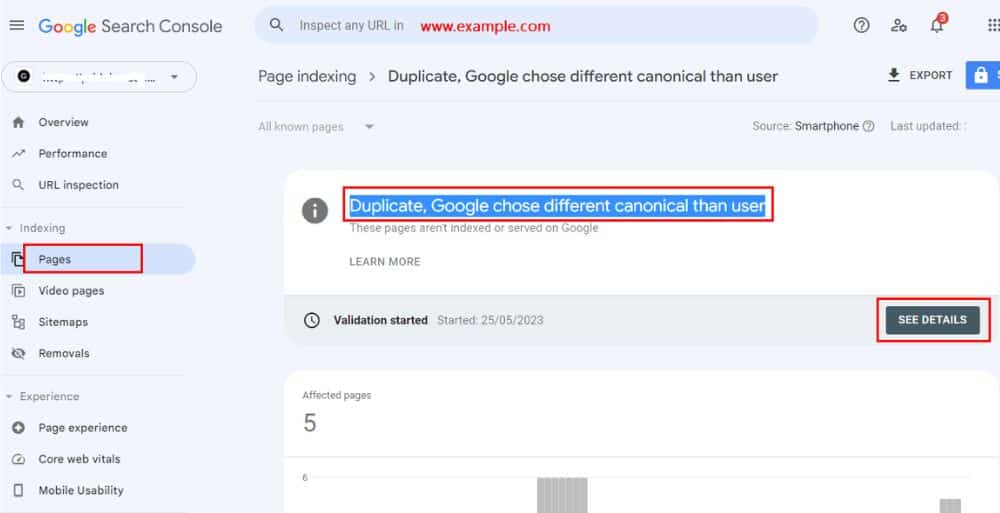
What does this status “Duplicate, Google Chose Different Canonical Than User” actually mean?
When Search Console says Google chose a different canonical, it’s telling you this:
Google grouped multiple URLs into a “these look like the same thing” cluster and picked one URL to represent that cluster in its index.
In one of the official community replies, a Product Expert explains the pattern bluntly: the tested page is seen as a duplicate of Google’s selected canonical, not the one you declared. And if your declared canonical isn’t actually similar enough to the page, Google “won’t ever choose that URL as canonical.”
This is the part beginners miss: a canonical tag isn’t magic. It’s just one signal. If your other signals scream the opposite—internal links, redirects, sitemap, host/protocol—Google shrugs and goes with what looks consistent.
My rule: I don’t touch anything until I see both canonicals
Before I change tags, redirects, or sitemaps, I open URL Inspection and look at two lines:
- User‑declared canonical
- Google‑selected canonical
That exact workflow is what Google’s own documentation and multiple troubleshooting guides recommend: use URL Inspection to see which URL Google actually treats as canonical before trying to “fix” anything.
If I’m on WordPress with an SEO plugin, the route is still the same:
- Search Console → Pages
- Why pages aren’t indexed → Duplicate, “Google chose different canonical” than the user.
- Open examples → Inspect each URL
- AIOSEO’s own troubleshooting doc walks you through this exact path before making any changes.
If you skip this step, you end up “fixing” the wrong URL variant and wasting a week. I’ve done that once—rewrote content on the URL I thought Google cared about, only to find out it had chosen a completely different pattern as canonical.
Why Google picks the “wrong” canonical (the stuff that actually breaks in production)
Google and the Product Experts list the common canonical failure modes like a checklist of pain, and real threads match it:
- Language variants without proper localisation signals
- Incorrect canonical elements (often CMS/plugin mistakes)
- Misconfigured servers (cross‑domain weirdness, old host still serving content)
- Malicious hacking (injected redirects or canonicals)
- Syndicated or near‑duplicate content
Copycat pages on other sites with stronger authority
One WordPress user who changed domains (example.org → example.co) saw both old and new URLs flagged as “Duplicate, Google chose different canonical than user”, even though .org correctly redirected to .co.
In that case, Google was still seeing content on both hosts and second‑guessing which one should be canonical during the move.
That’s not theory. That’s what happens when your setup sends mixed signals, and Google picks what it thinks makes sense.
Why my canonical tag “lost”: Google’s strongest signals
Google explicitly describes the relative influence like this:
- Redirects: strong signal
- rel=”canonical”: strong signal
- Sitemap inclusion: weak signal
Cool, but:
- Do your internal links point to a different version?
- Does your sitemap list the non‑preferred URL?
- Do you have a 301 chain that effectively says “this isn’t the final page”?
Google’s guidance even suggests asking whether the Google‑selected canonical might make more sense for users—that’s a polite way of saying: your preference might be wrong or poorly supported by your own signals.
Duplicate, Google Chose Different Canonical Than User: The Step‑by‑Step Fix (Scars Edition)
Step 1: I export the affected URLs and group them by “duplicate pattern”
From Search Console, I go:
- From Search Console, I go to Indexing → Pages.
- Then I open “Duplicate, Google chose different canonical than user”.
- Finally, I open Examples and export the list.
Why pages aren’t indexed → Duplicate, Google chose different canonical than user.
- Open Examples, then export the list.
- Then I sort by obvious patterns:
- http vs https
- www vs non‑www
- Trailing slash differences
- Parameters like utm_, ref, sort
- Category vs tag vs filtered category URLs
If you don’t group by pattern, you’ll treat 500 URLs like 500 separate problems. It’s usually 2–3 problems wearing 500 masks. Reddit threads show the same thing: once people group URLs by pattern, the mess stops looking random.
Step 2: I choose the canonical URL like an adult (one format, no exceptions)
I pick exactly one version as “the real one”:
- I pick one “real” version and stick to it:
- HTTPS
- Either www or non-www (one only)
- One trailing-slash rule (pick it and keep it consistent)
- Clean URLs (no tracking parameters)
- Then I make sure the canonical URL self-references with rel=”canonical”.
Then I make sure the canonical page has a self‑referencing canonical. AIOSEO’s docs and other plugin guides explicitly state that the canonical URL should point to itself.
Example: (clean and boring, which is what you want):
- /my-page/
- Boring beats clever, every time.
Step 3: I stop letting duplicates “self-canonicalise” One of the nastiest real‑world mistakes:
- On duplicate variants, I point rel=”canonical” to the preferred URL (as long as the content is the same or near-identical)
- /my-page/?sort=price → canonical: /my-page/
- /my-page/?utm_source=xyz → canonical: /my-page/
Fixing Duplicate, Google chose different canonical than user: So on every duplicate variant, I point canonical to the preferred URL:
- /my-page/?sort=price → canonical: /my-page/
- /my-page/?utm_source=xyz → canonical: /my-page/
Although it’sThis is correct as long as the duplicate URL shows the same (or near-identical) content. If a parameter changes the content meaningfully (true faceted pages), I don’t canonicalise it to the main URL.
That lines up with the Product Expert’s advice in the GSC thread: duplicates need to actually map to the same canonical, otherwise Google won’t accept the relationship.
Step 4: If a URL should not exist, I redirect it (because redirects hit harder)
Given Google’s own hierarchy, redirects are a stronger signal than tags.
So for obvious duplicates (wrong protocol, wrong host, junk variants), I don’t hint—I redirect:
- http://example.com → https://example.com
- example.com → www.example.com (or the reverse, but pick one)
- /page → /page/ (or the reverse, consistently)
In the WordPress “change of address” thread, the site owner moved from .org to .co and received “Google chose different canonical” warnings.
The underlying fix is boring but effective: correct 301s from old to new, ensure consistent canonicals on the new domain, and be patient while Google re‑crawls and updates its clusters.
A Product Expert in the GSC thread essentially boils it down to this: your tools are canonical tags and 301 redirects; line them up with what you actually want.
Step 5: I fix internal links because internal links are silent sabotage
This is where most “canonical fixes” fail in real life.
People update the canonical tag but keep linking internally to the wrong URL version—menus, breadcrumbs, related posts, even XML feeds. Then Google sees a contradiction and chooses the option that looks most consistent.
So I do this:
- Update navigation links to the canonical URL format.
- Update breadcrumbs
- Update “featured” and “popular” modules
- Kill parameterised internal links where possible.
- If Google chooses a different canonical, it’s often because your site is voting against itself.
Step 6: I purge non‑canonical URLs from the sitemap (because sitemaps are weak, but still loud)
- Google calls sitemap inclusion a weak signal—but weak signals still matter when everything else is messy.
- AIOSEO’s troubleshooting guide is crystal clear: multiple page versions and conflicting canonicals often occur when the sitemap lists non‑canonical URLs alongside canonical ones.
So I ensure:
- The sitemap includes only canonical URLs
- Parameter URLs never appear in the sitemap.
- Old variants are removed after redirects go live.
- This doesn’t “force” Google to obey you, but it removes one more source of mixed messages.
Step 7: If it’s “different content” but Google still flags it, I hunt for template duplication and thin differences.
The complaint you see in both GSC threads and Reddit:
- “My pages have different content but they’re still being deindexed / flagged as duplicates.”
- In practice, “different” often means:
- Same template
- Same headings
- Same blocks in the same order
- Only small swaps (city name, product code, minor wording changes)
The Product Expert’s answer in Google’s thread spells it out: if the pages are similar enough, Google clusters them. If your declared canonical doesn’t actually match the page type or content, Google won’t accept it.
So I do one of these:
- Merge near‑duplicates into one stronger page.
- Rewrite the “unique” sections so they’re truly unique, not just label swaps.
- Beef up weak category/listing pages so they have real value beyond the product grid.
This is the part people hate because it’s content work, not just toggling a plugin setting. But in human‑reported cases, this is often the turning point between “still duplicate” and “finally indexed.”
Step 8: I rule out the ugly stuff: server confusion and injected tags
When canonicals get truly weird (cross‑domain choices, random hosts), I stop assuming it’s an SEO plugin issue and start checking the infrastructure:
- Does another host or domain serve identical content?
- Are there unexpected redirects between old and new domains?
- Is the server returning the wrong content for alternate hosts or languages?
- Did someone inject a canonical header or HTML tag?
There’s a GSC thread where Google started selecting an external domain as canonical because both domains served the same content, and the external one had stronger authority.
Google’s docs explicitly list misconfigured servers and hacking as real causes for unexpected canonical choices.
Step 9: I request reindexing — then I wait (because Google doesn’t care about my schedule)
After fixes, I use URL Inspection and request indexing for a sample of URLs. Then I leave it alone.
Canonical changes don’t show instantly. I request indexing for a sample, then give Google time to recrawl and reprocess signals before changing anything again.
If you change everything today and panic tomorrow, you’ll introduce more conflicting signals and delay the fix.
Common “messy reality” scenarios I see every month.
1) Parameter URLs that multiply overnight
Campaign tracking is the silent killer. One day you have /page/. The next day you have:
- /page/?utm_source=…
- /page/?ref=…
- /page/?sort=…
Google treats these as different URLs. If they self-canonicalise or appear in your sitemap, you’ll trigger canonical confusion in no time. Forum users dealing with this see the “Duplicate, Google chose different canonical” status tied directly to these parameterised variants.
2) The CMS/plugin that “helped” you by generating the wrong canonical
Google calls out “incorrect canonical elements” from CMSs or plugins as a common problem, and plugin vendors like AIOSEO have full troubleshooting pages for exactly this error.
That includes:
- Canonicals pointing to outdated or non‑preferred URLs
- Front pages canonicalising to the wrong language or version
- Self‑referencing canonicals on duplicates where they should point to a master URL
Sometimes the fix is embarrassingly simple: open the source, find the canonical tag, and confirm it points to the correct final URL. Several WordPress support threads boil down to “Yoast/AIOSEO/other plugin was outputting the wrong canonical after a change of address, and updating settings fixed it.”
3) Localised pages getting canonicalised together
If you run multiple localised versions and the content is too similar, Google’s own guidance says language variants without proper annotations can cause canonical issues.
On Reddit, you see this in practice: one language version (often English) wins as canonical, while others get parked under “Duplicate, Google chose different canonical than user.”
If you ignore this, you’ll watch one version win and the others sit out indefinitely.
- Quick checklist (what I verify before I stop caring)
Your preferred canonical URL must: - Return a clean 200 OK and load normally (no soft errors).
- Contain a self‑referencing canonical tag.
- Be the only version included in your sitemap.
- Be the only version used in internal links (navigation, breadcrumbs, modules).
Every duplicate URL must:
- Either a 301 redirect to the canonical (best when duplicates should not exist), or
- Canonicalise to the preferred URL (never self-canonicalise if it’s a duplicate).
- Be removed from your sitemap.
- If all of that is true and Google still refuses your canonical, either:
- Your chosen URL isn’t actually the best option (thinner, weaker signals), or
- There’s still an unresolved duplication or server issue in the background.
The Bottom Line
When Google chooses a different canonical, it’s rarely “random.” It’s usually your site sending mixed signals—tags saying one thing, links and sitemaps saying another, or servers doing something embarrassing behind your back. Google’s own docs and the forum threads you pointed at document the exact causes: bad canonicals, server misconfig, hacked or copied content, and language mishandling.
I don’t fight this with hope. I fight it with consistency: one canonical format, redirects for junk variants, canonicals that don’t lie, sitemaps that don’t include trash, and internal links that stop voting for the wrong URL. Once those are aligned, “Google chose different canonical” usually stops—not because Google suddenly respects you, but because you finally stopped.
Check out: On-page SEO Key Ranking Factors: A Complete Beginner’s Guide