

In today’s interconnected world, wireless networks are really important. From personal home devices to enterprise infrastructures, these networking technologies power much of our modern digital communication.
When we get to 2025, substantial progress in wireless technology is anticipated, particularly with the debut of fresh frequency bands, better reliability, and faster speeds. This article explores the newest perspectives on wireless network types, frequencies, channel stability, range, data transmission, security methods, and troubleshooting to guarantee uninterrupted, solid, wireless connections.
Understanding Wireless Network Frequencies
Wireless networks rely to a large extent on frequency bands to work well. As technology progresses, new frequency bands tend to be used to serve upThey are sort of like the lanes on a freeway, where each lane can go fast in its own way. But let’s not digress. Here’s a list of the most important frequency bands in wireless networks:
2.4 GHz Radio Band: Advantages and Disadvantages
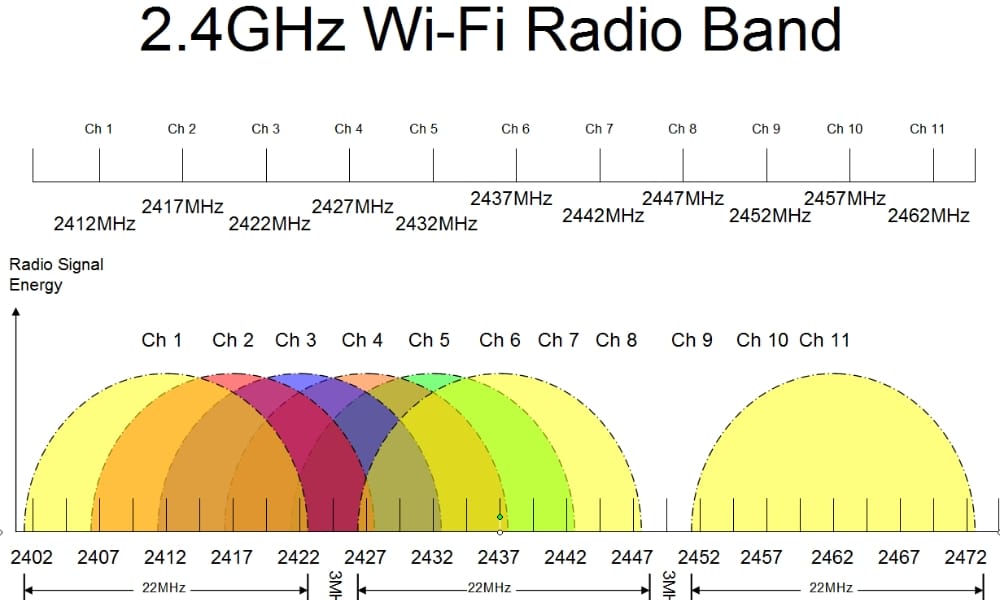
The 2.4 GHz band has for years been the mainstay of Wi-Fi networks. It offers a broader coverage area, and it is supported by most devices. But this frequency band is heavily congested because it’s used by so many devices, including microwaves, Bluetooth devices, and baby monitors, as well as far too many Wi-Fi networks. Even so, the 2.4 GHz band is still the ideal choice for the simplest, most basic applications—like browsing and the very lightweight Internet of Things.
Key Features:
- Range: Extended scope in comparison to elevated frequencies.
- Speed: Slower velocities that are appropriate for typical web-surfing.
- Compatibility: Most commonly supported by devices dating before 2013.
5 GHz Band: Speed and Performance
Compared to 2.4 GHz, the 5 GHz band provides faster data transmission and less interference. This band is perfect for bandwidth-heavy activities like video streaming, online gaming, and transferring large files. With more non-overlapping channels, 5 GHz is generally less crowded, making it even more suitable for high-density device areas.
Key Features:
- Range: More limited than that of 2.4 GHz.
- Speed: Accommodates maximum rates, perfect for high-performance jobs.
- Compatibility: Most recent hardware is able to. Devices of not-so-distant vintage, however, may struggle.
6 GHz Band (Wi-Fi 6E): Expanding the Spectrum
Wi-Fi 6E is the newest offering in wireless networking, and it brings along the novel 6 GHz band. The fundamental promise of the 6 GHz band, as part of the Wi-Fi 6 standard, is that it allows for substantially higher speeds and a decrease in latency. So what else is special about the 6 GHz band? For starters, it offers way more spectrum, which really translates to “not as many people using it at the same time.” And because it operates in a band with a much wider channel, it can move more data with the same amount of energy, which means more reliable connections.
Key Features:
- Range: The 5 GHz band is similar, but has more space for channels.
- Speed: A swifter pace, perfect for ultra-high-definition streaming and pro apps.
- Compatibility: Devices must support Wi-Fi 6E.
Choosing Stable Wireless Network Channels for Optimal Performance
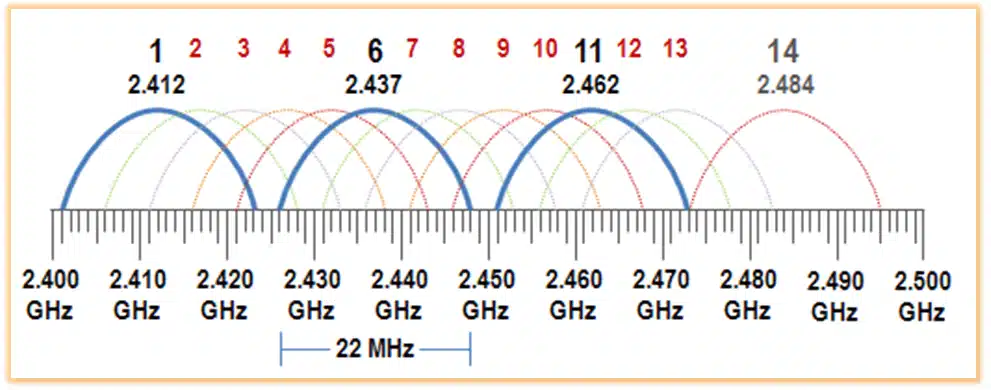
- Choosing the correct channel is essential to keeping a wireless network fast and stable. Each frequency band has different channels, and depending on the choice, performance can vary greatly. In today’s world, it’s even more vital to pick a non-overlapping channel because the environments we live in are more congested than ever.
Channels for the 2.4 GHz Band
- There are only 3 channels in the 2.4 GHz band that do not overlap with each other: channels 1, 6, and 11. In a crowded wireless environment, these channels are preferred because they do not interfere with one another. Selecting one of them helps to ensure that your network does not get bogged down by overlapping signals.
Channels for the 5 GHz Band
- The 5 GHz part has way more channels, and that’s a good thing for situations where you have just lots of wireless networks around you. You need to use channels that won’t interfere with each other, and most people using the 5 GHz band in this part of the world are using channels 36, 40, 44, and 48. These channels are in the upper part of the 5 GHz band, and they are way cleaner than the channels in the lower part of the 5 GHz band.
Speed and Reliability in Wireless Networks
Two critical performance aspects of a wireless network are speed and reliability. These two network characteristics become particularly important when a wireless network is situated in an environment teeming with users or where instantaneous data communication is of the essence.
Bandwidth and Speed
Directly associated with network speed, bandwidth can be thought of as channel width—wider channels permit more flow and more data results in more speed. In general, the 5 GHz and 6 GHz bands are wider, which means they’re better and faster than the 2.4 GHz band.
Signal Strength Speed and Quality
Another vital element that influences the reliable functioning of a wireless network is the strength of its signal. A signal with good strength leads to an equally good connection, where one can expect fairly stable speeds and a connection that “just works.” Meanwhile, a weak signal, with a connection that is in the “okay” range, is likely to present issues like slow speeds and dropped packets. There are a few ways to jack up the signal strength for a connection to the router, and they tend to be applying Occam’s Razor to the solution space.
Network Congestion
In situations where a shared network supports many simultaneous users, the network can become severely congested. This congestion is a major reason why people complain about poor network performance. To address this problem, network managers have a few tools at their disposal. They can use various network management tools to monitor network performance. (What is performance?) They can also use what are known as Quality of Service (QoS) protocols. These methods can help significantly in solving the network congestion problem.
Wireless Range and Data Transmission Speeds by Frequency
The frequency band has a pronounced effect on transmission distance and data rates. Users can tailor their networks to achieve optimal performance by understanding the idiosyncrasies of each frequency.
2.4 GHz Range vs Speed
The best band for wide coverage is the 2.4 GHz band, yet it is the slowest of the bands. Inside your house, it is ideal for web-browsing applications. Even more, it is great for controlling IoT devices, which are becoming ubiquitous in the home. By using the 2.4 GHz band, one can penetrate walls and obstacles more effectively than with the other two bands. The penetration ability also means that, in larger spaces, one can achieve better coverage than with the 5 GHz band.
- Effective Range: Maximum of 150 feet indoors but with more sluggish performance.
- Speed: Generally as high as 450 Mbps (802.11n) or 600 Mbps (802.11ac)
5 GHz Range vs Speed
The 5 GHz band provides faster speeds, but at a range that’s shorter than the 2.4 GHz band’s (again, because of the higher frequency). It’s perfect for applications that need to pull a lot of data from the network really fast (or push it out), like HD video or online gaming. But in the real world, this band works best when the router and the device are in the same room or close by.
- Range: As much as 75 feet can be covered indoors, with even greater velocity.
- Speed: Can achieve a maximum of 1.3 Gbps with Wi-Fi 5 (802.11ac) and 9.6 Gbps with Wi-Fi 6 (802.11ax).
6 GHz Range vs Speed
Wi-Fi 6E utilizes the 6 GHz frequency to provide extremely fast speeds and low latency. Range, however, is even shorter than with 5 GHz, and the number of obstacles an incoming signal has to traverse also counts against it. But the real story with Wi-Fi 6E is not so much about the speed and range as it is about the bandwidth. The 6 GHz band is a massive pipe, and it can accommodate almost any application without crimping.
- Range: Shorter range than 2.4 GHz and 5 GHz.
- Speed: Velocities can exceed 9 Gbps.
Conflicts in Dual Router Setups with Different SSIDs and Frequency Channels
Setting up several routers within a home or office network can lead to several problems, particularly when they operate under different SSIDs and frequency channels.
Potential Wireless Network conflicts include the following
Interference Between Routers
Should two routers be set to the same channel, or neighboring channels, they will interfere with one another. This will degrade the network performance of both routers. It can cause signal drops, slower speeds, and increased latency.
Roaming Problems
When the two routers are set to different SSIDs, devices may not switch between them as seamlessly as one might expect. This can cause disruptions in connectivity as your devices stubbornly cling to one router while the signal from the other grows ever stronger.
Solution
One effective solution to these problems is to make all routers and access points use the same single network name (SSID). If more coverage or capacity is necessary, a mesh network may be employed. Mesh systems are a new wave in home networking. They work by using multiple satellite nodes, most of which are also wireless, to extend the signal throughout the space that needs coverage.
Public vs. Private Wireless Networks: Key Differences
Public vs. Private Wireless Networks: Key Differences
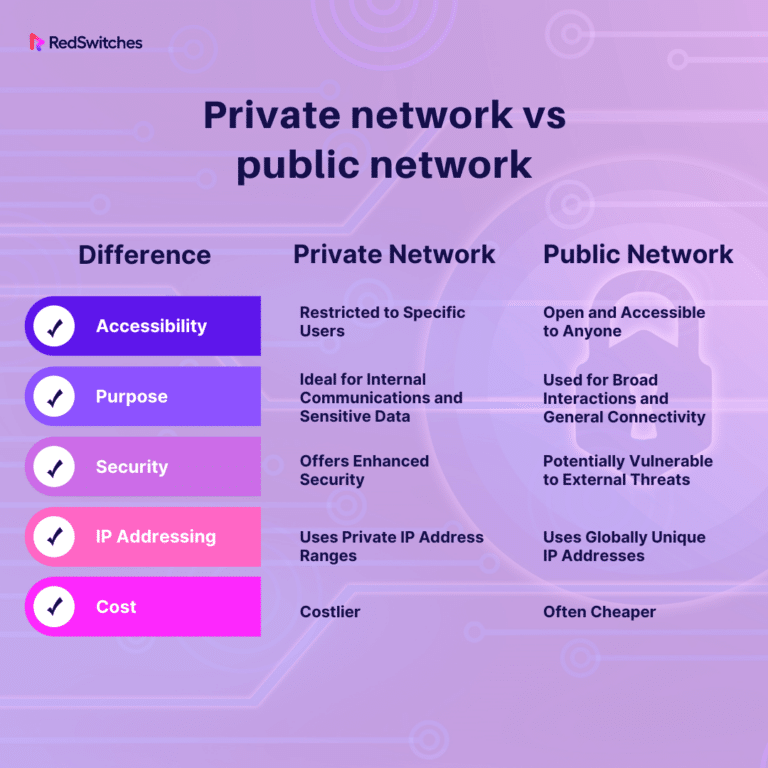
Wireless networks can be classified into public and private networks, each serving different purposes and requiring distinct security measures.
Public Networks: Open Access and Security Risks
Public networks are open to anyone, making them convenient but insecure. Examples include free Wi-Fi at coffee shops, airports, or libraries. These networks often lack encryption, which leaves them vulnerable to attacks.
Key Features:
- Open access for all.
- No encryption or security protocols.
- Risk of data theft and unauthorized access.
Private Networks: Controlled Access and Enhanced Security
Private networks are restricted to authorized users, ensuring better control over the connected devices. They are typically secured using encryption protocols like WPA3, making them far more secure than public networks.
Key Features:
- Controlled access, typically requiring passwords or certificates.
- Strong encryption (e.g., WPA3).
- Better security and less vulnerability.
Authentication Methods in Wireless Networks
Authentication techniques serve to protect wireless networks and to ensure that only those devices that are supposed to connect can do so.
WPA3 Encryption
WPA3 is the most recent security protocol for Wi-Fi, and it offers even better encryption and protection than its predecessor, WPA2. Most of the modern devices that connect to wireless networks have made the upgrade to WPA3. And because it is the standard Semper Fi now uses, all guests connecting to our network will be using this security protocol.
EAP (Extensible Authentication Protocol)
EAP is frequently employed in enterprise networks and offers a framework for diverse authentication techniques, such as EAP-TLS and EAP-PEAP. For authentication, these protocols necessitate either a certificate or a password, which conveniently adds another layer of security.
Multi-Factor Authentication
Certain networks, particularly those in the business world, are using multi-factor authentication (MFA) for wireless access. MFA is a way to make sure that the person accessing a system is really who they say they are. It does this by requiring two or more verification factors, which can take a number of different forms. Here are some of the more common ways that people are verified.
Authentication Methods in Wireless Networks: RADIUS Server Explained
Today’s wireless networks demand secure and efficient user authentication to function properly. The Remote Authentication Dial-In User Service manages “AAA” (that’s authentication, authorization, and accounting) for networks and plays a key role in keeping modern networks secure. This section talks about what a RADIUS server does, its parts, how it works, and some common problems you might have if it’s not working. After reading this, you should understand not only how RADIUS works, but also how it fits into the bigger picture of modern network security.
What is a RADIUS Server?
A centralized system for authenticating users trying to get into a network uses RADIUS (Remote Authentication Dial In User Service). It operates on a client-server model, using as its clients the network access servers (NASs) for which the ruled users have permission to access. When a client sends an authentication request to a RADIUS server, the server makes an access decision and sends back a response that tells the client to let the ruled user in or to keep that user out.
Components of a RADIUS Server
- Authentication Server: Verifies user proof of identity against a data storage or directory service.
- Authorization Server: Establishes the extent of accessibility permitted to the confirmed user.
- Accounting Server: Keeps track of what users do, when they do it, and how much data they use—in order to bill them or to audit their accounts.
- Shared Secret: A pre-established credential that enables protected communication between a NAS system and a RADIUS server.
- User Database: Contains credentials and attributes for users, typically combined with directory services such as LDAP or Active Directory.
RADIUS Authentication Process
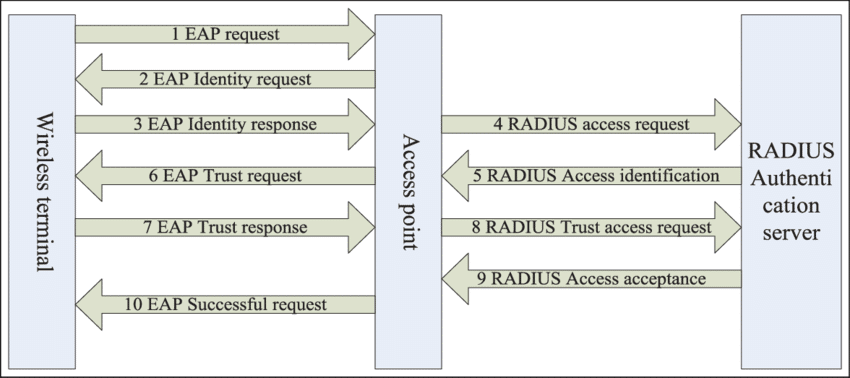
Several steps are involved in the process of authentication:
- Access-Request: The NAS sends a request to the RADIUS server containing the user’s credentials.
- Access Challenge: If extra information is required (for instance, multi-factor authentication), the server demands it from the user.
- Access-Accept: Once the validation is complete and successful, the server will grant access and will also send the configuration parameters needed by the client.
- Access-Reject: If authentication fails, access is denied.
This procedure verifies that no unauthorized users are allowed entry to the network.
Factors Affecting RADIUS Wireless Network Meteor Authentication

A number of factors can affect the outcome of RADIUS authentication:
Shared Secret Mismatch: If the NAS and RADIUS server shared secret don’t match, authentication will fail.
- Shared Secret Mismatch: Unsuccessful authentication happens when the usernames or passwords entered are invalid.
- Incorrect User Credentials: Communication issues that arise between the NAS and RADIUS server can interrupt the authentication process.
RADIUS server configuration and NAS settings: RADIUS server and NAS settings require proper configuration to allow correct authentication. - Failures in authentication: Users may be denied access because of incorrect credentials; or because the server they are trying to access is too busy responding to other requests, and times out.
- Network Connectivity Issues: Authorization errors occur when users are authenticated but not allowed access to certain resources or services.
- Configuration Errors: Misconfigurations in the RADIUS server or NAS settings can impede authentication.
Wireless Network: Common RADIUS Authentication Issues
To troubleshoot RADIUS authentication problems, follow these steps:
- Authentication Failures: The first step in the configuration we are doing is to make sure both the NAS and the RADIUS server have the shared secret we are going to use, and that both sides have the same shared secret. If you shared with one and didn’t share with the other, clearly there’s no way to get through this door.
- Verify Network Connectivity: Ensure the NAS can communicate with the RADIUS server without any firewall or routing issues.
- Logs of Review: The error messages or unsuccessful authentication attempts can be found in the logs of the RADIUS server and NAS.
Diagnostic tools are used to simulate authentication requests in order to identify problems that could potentially arise.
Conclusion
As of 2025, wireless networks have advanced remarkably, giving us faster, more reliable, and more secure connections. But some old headaches still haven’t gone away, and two of them—network congestion and frequency management—are closer than ever to being solved. At least, we’d like to think so. With all the new applications and devices clamoring for space, selecting the right frequency band and channel is more critical than ever to ensure optimal performance and minimal interference. That’s saying something when you consider all the dense urban areas simply stuffed with 2.4 GHz devices.
Simultaneously, the establishment of RADIUS (Remote Authentication Dial-In User Service) servers has become a vital component in ensuring that our wireless networks operate securely and efficiently. RADIUS servers handle our Authentication, Authorization, and Accounting (AAA) processes, making certain that only permitted individuals can reach network resources. They manage several types of authentication methods, but two of the most prominent are password-based systems and certificate-based systems, with the latter offering enhanced security and almost entirely eliminating the kinds of vulnerabilities that plague password systems.
Still, these advancements mean that network administrators now have even more work to do to stay ahead of potential problems. Why? Because this very technology can—and does—lead to a small number of big problems if it is misconfigured or if security protocols are left outdated. No matter how much cutting-edge technology is thrown at this problem, basic wireless network access control is still dependent on proper configuration and monitoring—22 hours a day, every day of the year.